
Why Your Store Needs a WooCommerce Helpdesk System

Customer support can make or break a WooCommerce store. Every day, store owners juggle order inquiries, refund requests, shipping complaints, and pre-sale questions arriving from email, contact forms, social media, and live chat — often with no unified system to manage any of it. Messages get buried, follow-ups are missed, and customers who feel ignored take their money elsewhere.
The cost of this chaos is real. 89% of consumers are more likely to make repeat purchases after receiving positive customer service, and up to 32% will leave a brand they love after just one bad experience.
Poor support does not just frustrate individual shoppers — it erodes brand trust, drives up refund rates, and quietly kills long-term revenue.
This post breaks down why WooCommerce stores struggle with customer support, what a WooCommerce helpdesk system actually does, and how switching to a structured support workflow improves efficiency, trust, and retention.
You will also find a comparison of support methods, common mistakes to avoid, and a recommendation for the best helpdesk plugin built specifically for WordPress and WooCommerce stores.
Support Genix
WordPress Support Ticket Plugin
Take Your Customer Support to The Next Level and Boost Customer Satisfaction Rates
Key Takeaways
- Inbox-based support fails WooCommerce stores.
- Helpdesk systems centralize all customer conversations.
- Faster responses directly build customer trust.
- Structured support reduces refunds and churn.
- Growing stores need scalable support systems.
- Support Genix offers unlimited AI-powered helpdesk.
What Is a WooCommerce Helpdesk System?
A WooCommerce helpdesk system is a support platform that centralizes, organizes, and tracks every customer inquiry your store receives — from initial submission through resolution. Instead of scattered email threads, each request becomes a support ticket with a unique ID, an assigned owner, a priority level, and a visible status (open, pending, or resolved).
Here is how the core workflow operates:
- Ticket creation: A customer reaches out via email, live chat, contact form, or social media. The system automatically converts the message into a structured ticket.
- Routing and assignment: Automation rules send the ticket to the right agent or department based on category, keywords, or customer type.
- Prioritization: Urgent issues rise to the top; routine questions queue behind them.
- Resolution and collaboration: Agents respond, add internal notes, and loop in teammates when needed — all within a single view.
- Closure and analytics: Once resolved, the system logs response time, resolution time, and satisfaction data for reporting.
Unlike a standard email inbox or a simple WordPress contact form, a helpdesk system adds structure, automation, and accountability to every customer interaction.
Live chat alone cannot do this either — chat handles real-time conversations but lacks the ticket tracking, assignment logic, and historical reporting a helpdesk provides.
Common Customer Support Challenges in WooCommerce Stores
WooCommerce store owners face a unique set of support hurdles that grow more painful as order volume increases.
- Messages scattered across channels: Customer inquiries arrive through email, contact forms, social media DMs, and sometimes WhatsApp. Without a central hub, agents switch between platforms constantly, and messages get buried.
- No visibility into open or resolved issues: In a shared inbox, there is no dashboard showing how many tickets are open, who owns each one, or how long a customer has been waiting.
- Repeated questions and delayed responses: “Where is my order?” and “How do I return this?” come in dozens of times a day. Without templates or a knowledge base, agents retype similar answers from scratch, slowing everything down.
- Missed follow-ups and frustrated customers: When there is no status tracking, it is easy for a partially resolved issue to fall off the radar. The customer waits. Frustration builds. A refund request or negative review follows.
- No performance data: Without reporting, you cannot measure response times, identify bottlenecks, or coach your team. You are essentially flying blind.
These problems compound as your store grows. What feels manageable at 10 orders a day becomes chaotic at 50 or 100.
Why WooCommerce Stores Need a Dedicated Helpdesk System
This is the heart of the matter. A WooCommerce helpdesk system directly addresses every challenge listed above — and delivers measurable business impact.
Centralizing All Customer Conversations in One Place
When emails, form submissions, chat messages, and social media inquiries all land in a single ticket dashboard, nothing gets lost. Agents stop switching between Gmail, Facebook Messenger, and a contact form plugin. Every conversation is visible, searchable, and organized by status and priority. This alone eliminates the “I thought someone else was handling it” problem.
Never Losing Customer Requests or Follow-Ups
Every inquiry automatically becomes a ticket with a unique ID and an assigned owner. If a ticket sits unresolved for too long, escalation rules kick in and alert a manager. Customers no longer fall through the cracks — and your team no longer scrambles to find that email from three days ago.
Improving Response Time With Ticket Prioritization
Speed matters enormously: 60% of online shoppers expect a response within 10 minutes. A helpdesk system lets you set priority rules so that high-value customers, urgent shipping issues, or refund requests automatically jump to the front of the queue. Teams using helpdesk software reduce average response times from hours to minutes.
Creating Accountability Within Support Teams
With clear ticket ownership and visible status tracking, every agent knows exactly what is on their plate. Managers can see who is overloaded, who needs coaching, and which categories generate the most tickets. This transparency eliminates duplicate replies and builds a culture of ownership.
Providing Consistent Customer Experiences
Saved replies, templated responses, and knowledge base integrations ensure that every customer receives accurate, professional answers — regardless of which agent handles the ticket. Consistency builds trust, and trust drives repeat purchases.
Reducing Refunds, Chargebacks, and Negative Reviews
Many refund requests and chargebacks stem from poor communication, not poor products. A customer who cannot get a timely update on a delayed shipment is far more likely to file a dispute. Structured support with automated status updates keeps customers informed and dramatically reduces escalation to refund requests or payment disputes.
Tracking Support Performance With Reports
A dedicated helpdesk provides dashboards covering first response time, resolution time, ticket volume trends, and customer satisfaction scores. These metrics reveal patterns — maybe Monday mornings spike with “where’s my order” tickets, or a specific product category generates 40% of all inquiries. Data-driven insights let you optimize staffing, improve product descriptions, and reduce recurring issues.
Scaling Customer Support as Order Volume Grows
Email scales poorly. Add 20 more orders a day, and a shared inbox turns into a mess. A helpdesk system scales smoothly — you add agents, create new categories, and handle 10x the ticket volume without sacrificing quality. Platforms offering unlimited tickets and agents mean your costs stay predictable even as your WooCommerce store grows.
WooCommerce Helpdesk System vs Email and Contact Forms
Understanding the differences helps clarify why upgrading matters.
| Feature | Email Inbox | Contact Forms | Live Chat | Dedicated Helpdesk System |
| Ticket tracking | None — manual sorting | Basic submission log | Session-based only | Full lifecycle tracking with unique IDs |
| Agent assignment | Unclear ownership | No built-in routing | Single-agent sessions | Automatic routing and assignment |
| Priority levels | Manual flagging | Not available | Not available | Automated priority rules |
| Multi-channel support | Email only | Web forms only | Chat widget only | Email, chat, forms, social, WhatsApp — unified |
| Customer history | Scattered across threads | Not stored | Limited to current session | Full order and interaction history in every ticket |
| Performance reporting | None | None | Basic chat metrics | Detailed dashboards with response time, resolution time, CSAT |
| Automation | Folder rules at best | Auto-reply only | Canned responses | Workflow rules, escalation triggers, AI-powered replies |
| Scalability | Breaks at 20+ daily inquiries | Limited | Requires live agents 24/7 | Handles thousands of tickets; scales with your team |
A WooCommerce helpdesk system is not just an upgrade from email — it is a fundamentally different operational model that brings reliability, visibility, and scalability to customer support.
Recommended: Support Genix — The Best Helpdesk Plugin for WooCommerce
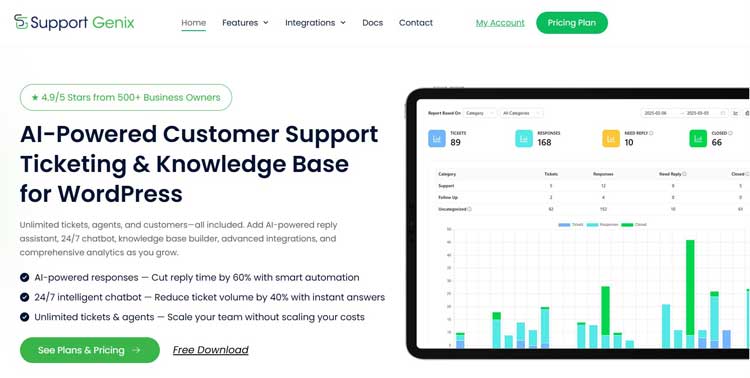
If you are looking for a WooCommerce helpdesk plugin that lives inside your WordPress dashboard and scales without per-agent fees, Support Genix stands out as the top choice.
Rated 4.9 out of 5 stars by 500+ business owners, it is purpose-built for WordPress and WooCommerce stores that need professional-grade customer support without the complexity or cost of external SaaS platforms.
Deep WooCommerce Integration
Support Genix connects directly with your WooCommerce store, so agents can view the complete order history, customer details, order status, and purchase data within every support ticket — no tab switching or asking customers for order numbers.
Tickets can be created automatically when new orders are placed, and customers can submit tickets straight from the My Account page using their order ID and email. This seamless connection reduces resolution time and gives agents instant context for every conversation.
AI-Powered Support Features
Support Genix includes a suite of AI tools that dramatically speed up your workflow:
- AI Reply Assistant (“Help Me Write”): Generates professional ticket responses in seconds, cutting reply time by 60% and helping agents handle 5x more tickets per day without burnout.
- 24/7 AI Chatbot: Answers customer questions instantly from your knowledge base, reducing incoming ticket volume by up to 40%. It works around the clock — weekends, holidays, and 3 AM included.
- AI Documentation Builder: Creates comprehensive knowledge base articles 10x faster than manual writing, with SEO-optimized content and consistent formatting.
Unlimited Everything — No Per-Agent Pricing
Unlike most helpdesk platforms that charge per agent per month, Support Genix offers unlimited tickets, unlimited agents, and unlimited customers on every plan. This means your support costs stay flat as your team and order volume grow — a critical advantage for scaling WooCommerce stores.
Multi-Channel Support and Integrations
Support Genix centralizes support from email, WhatsApp, Slack, WooCommerce, Envato, Tutor LMS, FluentCRM, WPForms, Easy Digital Downloads, and BetterDocs — all in one dashboard. Email-to-ticket conversion automatically turns incoming emails into organized tickets, while webhook integrations connect Support Genix to tools like Zapier and HubSpot for advanced automation.
Comprehensive Reporting and Analytics
Track ticket activity, first response time, resolution performance, and agent productivity through visual dashboards. Filter reports by date range and category to identify peak support periods, measure team responsiveness, and make data-driven decisions about staffing and workflow improvements.
Key Features at a Glance
- Unlimited tickets, agents, and customers
- WooCommerce order history inside every ticket
- AI reply assistant and 24/7 chatbot
- Email-to-ticket conversion
- Knowledge base with AI documentation builder
- WhatsApp, Slack, and webhook integrations
- Ticket priority system, tags, and custom fields
- Automatic agent assignment and ticket transfer
- Saved replies and email templates
- Performance insights and scheduled reports
- GDPR compliant with full data control
- 5-minute setup with guided wizard
Pricing
Support Genix offers both yearly and lifetime plans — with lifetime pricing being a standout value rare in the helpdesk market:
| Plan | Yearly | Lifetime |
| Personal (1 website) | $59/year | $149 one-time |
| Developer (5 websites) | $99/year | $399 one-time |
| Agency (100 websites) | $149/year | $699 one-time |
A free version is also available on WordPress.org with core features including AI chatbot, Help Me Write, unlimited tickets, and knowledge base management.
For WooCommerce store owners who want a powerful, affordable, and truly scalable customer support system that works natively inside WordPress, Support Genix delivers everything you need to provide fast, organized, and professional customer service.
Support Genix
WordPress Support Ticket Plugin
Take Your Customer Support to The Next Level and Boost Customer Satisfaction Rates
Common Mistakes WooCommerce Stores Make With Customer Support
Even well-intentioned store owners fall into these traps:
- Relying solely on an email inbox: A shared Gmail account works for a handful of daily inquiries. Beyond that, duplicate replies, lost messages, and zero accountability become inevitable.
- No ticket ownership or priority rules: Without clear assignment, agents assume someone else will handle urgent issues. The result is delayed responses and frustrated customers.
- No response time expectations: If your team has no SLA targets, there is no benchmark for improvement. Setting first-response and resolution-time goals — and tracking them — transforms support quality.
- Ignoring customer support history: When agents cannot see a customer’s past tickets, order history, or previous resolutions, every interaction starts from scratch. This wastes time and feels impersonal.
- Skipping self-service options: A knowledge base or FAQ section can deflect 40% or more of incoming tickets. Stores that skip self-service drown their agents in repetitive questions that could be answered automatically.
Frequently Asked Questions
What is a WooCommerce helpdesk system?
A WooCommerce helpdesk system is a support platform that converts customer inquiries from email, chat, forms, and social media into organized, trackable tickets within your WordPress dashboard. It assigns ownership, tracks status, and provides analytics so no request goes unanswered.
Do small WooCommerce stores need a helpdesk?
If you handle fewer than 10 inquiries a day through a single channel, a shared inbox may suffice. However, once you exceed 15 daily inquiries, use multiple communication channels, or have more than two support team members, a helpdesk system prevents lost messages and improves response times significantly.
How does a helpdesk system improve customer support?
It centralizes all conversations, automates ticket routing and prioritization, provides templates and knowledge bases for faster replies, and delivers performance reports. Teams using helpdesk software see significant improvements in both response time and customer satisfaction.
Can a helpdesk system reduce refunds?
Yes. Many refund and chargeback requests originate from poor communication rather than product defects. Timely responses, proactive status updates, and organized follow-ups address customer concerns before they escalate to disputes.
What features should a WooCommerce helpdesk include?
Look for ticket management with priority levels, multi-channel support, automation and workflow rules, a built-in knowledge base, WooCommerce order integration, performance reporting, SLA tracking, and team collaboration tools. AI-powered reply suggestions and 24/7 chatbots are increasingly valuable additions.
Final Word: Build a Support System That Grows With Your Store
Structured customer support is not a luxury — it is the backbone of customer trust, retention, and long-term revenue for any WooCommerce store. The stores that thrive are not necessarily the ones with the largest teams; they are the ones with the smartest systems in place.
If your current workflow involves checking multiple inboxes, manually tracking who replied to what, or hoping that no customer message slips through the cracks, it is time to rethink the process. A WooCommerce helpdesk system replaces guesswork with visibility and chaos with consistency.
Start by reviewing your current support workflow. Identify where messages get lost, where responses slow down, and where your team spends time on tasks that could be automated.
Then organize your customer requests more effectively — whether that means adopting a dedicated helpdesk plugin like Support Genix, building a knowledge base, or setting clear response-time goals.
The goal is simple: prepare your WooCommerce store for growth by making customer support a competitive advantage, not a bottleneck.