How to Say “Sorry for the Inconvenience” Professionally: 25 Alternatives and Examples

Quick Answer: “Sorry for the inconvenience” is overused because it is vague and impersonal. Replace it with a phrase that names the specific problem, acknowledges its impact on the customer, takes appropriate ownership, and states what happens next. The alternatives and templates below are starting points to customize with verified details.
“Sorry for the inconvenience” has become one of the most hollow phrases in customer service.
When something goes wrong, customers want to know that someone understood the problem, is handling the resolution, and has a plan. A generic phrase does none of that.
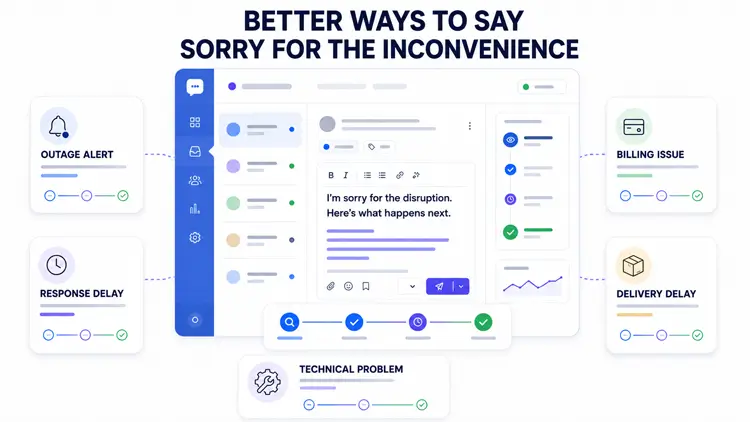
This guide gives you 25 alternatives, situational examples, two complete email templates, and a five-part framework so your team can write an effective, professional apology in any situation.
Table of Contents
25 Professional Apology Phrases to Customize
Use only the phrases that match the verified facts. Do not promise a refund, resolution, escalation, fix, preventive action, or timeline unless it has been confirmed and authorized.
Each phrase below works differently. Some acknowledge impact, some accept ownership, and some redirect to action. Pick the one that fits the situation and the verified facts.
1. “I apologize for the trouble this has caused.”
2. “I understand how frustrating this must be.”
3. “Please accept my sincere apology for [specific issue].”
4. “I realize this has disrupted your [day/work/plans] and I’m sorry.”
5. “I’m sorry this happened. I want to make sure it is handled correctly.” [Use only after confirming what occurred and your authority to act.]
6. “This is not the experience we want you to have.”
7. “I’m sorry we let you down on this.”
8. “Thank you for bringing this to our attention. I apologize for the impact.”
9. “I’m reaching out to apologize personally for [specific issue].”
10. “We apologize for the delay and appreciate your patience while we look into this.”
11. “I can see why this is frustrating. I’m sorry and here’s what I’m doing now.”
12. “I’m sorry for the confusion this caused. Let me clarify what I can confirm right now.”
13. “I apologize for this error. Here is what I can confirm about the next step.” [Complete only with verified details.]
14. “We’re sorry for any disruption this caused and are investigating what happened.”
15. “I deeply regret that this happened and want to make sure it is addressed properly.”
16. “I want to make sure this is corrected as quickly as possible.” [Use only when a correction has been authorized.]
17. “I’m sorry you experienced this. Let me look into it right now.”
18. “You deserved better from us. I apologize and am looking into what can be done.”
19. “I understand this has taken up your time and effort. I’m sorry for that.”
20. “We apologize for the error and are reviewing the next step.” [State a correction only once confirmed.]
21. “I’m sorry for the wait. Here’s where things stand and what happens next.”
22. “I’m sorry about the charge on your account. I’m reviewing it now and will confirm the next step by [time].” [Use “we have corrected your account” only after the correction is complete and verified.]
23. “I’m sorry this wasn’t resolved sooner. Here’s the current status and what I’m doing now.”
24. “Thank you for your patience. I apologize for the delay and want to give you an update.”
25. “I’m sorry this took longer than expected. I’m escalating this now so the right person can handle it.” [Use only when escalation is confirmed.]
Which Apology Phrase Should You Use?
The right phrase depends on what went wrong and what has been confirmed. Use this table as a starting point, not a script.
| Situation | Suggested Phrase |
| Service or website outage | “I’m sorry for the disruption. We’ve confirmed that [service] is currently unavailable and are investigating.” |
| Response or processing delay | “I’m sorry for the wait. Here’s where things stand and what happens next.” |
| Billing concern under review | “I’m sorry for the concern caused by the charge on your account. We’re reviewing it and will confirm our findings and the available next step by [time].” |
| Confirmed billing correction | “We apologize for the billing error. The correction has been processed and you will receive a confirmation by [time].” [Use only when the correction is verified.] |
| Late or missing delivery | “I apologize for the delay in your delivery. Let me find out exactly what happened.” |
| Software or technical bug | “I’m sorry this issue is affecting your work. Our team is looking into it.” |
| Customer waited too long on hold | “I’m sorry you had to wait. Thank you for staying on the line.” |
| Incorrect information was sent | “I apologize for the confusion this caused. Let me clarify what I can confirm right now.” |
| Escalation confirmed | “I’m sorry this wasn’t resolved sooner. I’m escalating this now so the right person handles it.” [Use only when escalation is confirmed.] |
What Does “Sorry for the Inconvenience” Mean?
“Sorry for the inconvenience” is a standard customer service phrase that acknowledges a disruption and expresses regret. It signals to the customer that something went wrong and that you are aware of it.
The phrase works as a starting point, but it is not a complete apology. It tells the customer nothing about:
- What specifically went wrong
- Who is responsible
- How it will be fixed
- When the customer can expect a resolution
An apology that ends at acknowledging inconvenience is an incomplete apology. The customer still does not know whether anything will change.
Why Can “Sorry for the Inconvenience” Sound Impersonal?
The phrase has a structural problem: it is written around the word “inconvenience” rather than around the customer’s specific experience. Customers can tell the difference between a templated response and one that references their actual situation.
Four reasons the phrase underperforms:
- It is vague. “Inconvenience” could describe anything from a slow website to a missed delivery.
- It does not accept ownership. The passive construction keeps the company at arm’s length.
- It offers nothing. There is no acknowledgment of impact, no action, and no timeline.
- Because the phrase appears frequently in templated support replies, it may feel impersonal when it is not followed by specific information or action.
Ineffective response: "We're sorry for the inconvenience. Please allow 3–5 business days for a response." — This tells the customer nothing about their specific issue and pushes the resolution further into the future without explanation.The following details should be included only after they have been verified and authorized.
Effective response: "I apologize for the delay in responding to your request. We did not reply within the expected timeframe, and I'm sorry for that. I am reviewing your case now. [If a cause has been confirmed, describe it here.] You will receive the next update by [specific date/time]. If you have questions before then, please reply to this message and someone from our team will respond." — This names the issue, takes appropriate ownership, and sets a clear next step with placeholders for any details that must be verified before sending.How to Write an Effective Customer Apology
An effective apology has five components. When you include all five, the customer understands what happened, what is being done about it, and when to expect an update. When you miss one, the apology feels incomplete.
- Name the issue — Identify the specific problem, not just “the inconvenience.”
- Recognize its impact — Acknowledge how the problem affected the customer without inventing feelings or losses the customer has not stated.
- Take appropriate ownership — Own your responsibility for the response and resolution. Avoid assigning blame before the facts are confirmed.
- Explain the verified or authorized action — State what is being done, but only if that action has been confirmed and is within your authority to commit to.
- Provide the next update and a support option — Tell the customer when they will hear from you again and how to reach you if they have questions before then.
Follow-up best practice: After sending an apology, follow up when the issue is resolved or when the next update time arrives — whichever comes first. Do not go silent after the initial message.
Example using all five components:
"Hi [Customer Name],
I'm writing to apologize for the charge that appeared on your account on [date] [Component 1: name the issue]. I understand that an unexpected charge can create concern and requires a prompt, accurate review [Component 2: recognize impact without assuming losses]. I want to make sure this is reviewed and addressed correctly [Component 3: appropriate ownership]. I have [authorized action — describe only if confirmed, e.g., flagged this with the billing team / initiated a review] [Component 4: verified action]. You will receive an update by [specific date/time], and if you have questions before then, please reply here [Component 5: next update and support option].
— [Your Name]"
For more on reply structure: Tips for writing effective support ticket replies
Professional Apology Examples for Common Customer Issues
Use these five scenario-specific examples as customizable starting points. Remove any conditional text that does not apply, and confirm every action and timeline before sending.
1. Apology for a Service or Website Outage
Prioritize the confirmed affected service, the current investigation status, the next status update time, and any verified workaround. Include a restoration time only when the responsible team has confirmed it.
Example: “"Hi [Customer Name], I want to apologize for the disruption affecting [service/platform]. We have confirmed that [service] is currently unavailable and our team is investigating. I know this affects your ability to [verified impact if stated by customer, or remove]. I will send you a status update by [specific time]. [Include only if confirmed: "We expect to restore service by [time] and will notify you immediately when it is back."] If you have an immediate need that cannot wait, please reply here and I will check what options are available. — [Your Name]"”2. Apology for a Delay
Keep the focus on the delay itself and the next step. Do not explain internal volume or staffing conditions.
Example: "Hi [Customer Name], I'm sorry for the delay in responding to your request from [date]. We did not respond within the expected timeframe. I'm reviewing your request now and will provide the next update by [specific time/date]. [Include only if confirmed: brief factual status.] If anything changes before then, I will reach out sooner. — [Your Name]"3. Apology for a Billing Error or Charge Concern
Distinguish between a confirmed billing error and a charge that is still being reviewed. Do not assume the customer experienced financial loss or stress unless they stated it.
Example: "Hi [Customer Name], I'm sorry about the charge on your account [describe the charge: amount, date, or type]. I understand that an unexpected charge can create concern and requires a prompt, accurate review. [If the error is confirmed:] We have confirmed this was a billing error and [authorized corrective action]. The correction will be reflected in your account within [X] business days. [If still under review:] We are reviewing this now and will confirm our findings and the available next step by [specific time]. Please reply here if you have questions. — [Your Name]"4. Apology for a Delivery Problem
Do not promise a replacement, refund, delivery date, or carrier action unless confirmed. Replace vague urgency with a conditional next step.
Example: “We've expedited your delivery at no charge. We've also added a 15% discount to your next purchase.”5. Apology for a Technical Issue
Do not state that the issue was reproduced or escalated unless that action has occurred. If still gathering information, say so clearly.
Example: "Hi [Customer Name], I apologize for the issue you are experiencing with [feature/functionality]. I understand this is disrupting your workflow and I'm sorry for the impact. [If the issue has been reproduced and escalated, state that clearly: "I have been able to reproduce this and have passed it to our development team."] [If still investigating: "I need the following information to investigate further: [specific details needed]. Once I have this, I will [next step] and update you by [time]."] Please reply here if you have additional questions or details to share. — [Your Name]"Short Customer Apology Messages
For live chat, SMS, or social media replies where length is limited, keep the apology tight but still specific.
- “I apologize for the delay. I’m looking into your case now and will update you within [X] hours.”
- “I’m sorry this happened. I have [verified action] and will follow up by [time].”
- “I can see why this is frustrating. I’m working on this now and will have an update for you by [time].”
- “I’m sorry for the confusion. Let me clarify: [brief explanation]. Does that help?”
- “I apologize — your message was not picked up earlier. I’m on it now and will have an answer for you shortly.”
Even in short formats, include the specific acknowledgment and the next step. Cutting those reduces the apology to noise.
Learn more tips for providing excellent customer service to strengthen your approach.
Manage Customer Support with Unlimited Tickets
Seamlessly manage customer support, respond promptly, and foster customer loyalty. Elevate your business’s reputation and satisfaction levels today.
- Unlimited Tickets
- Unlimited Users
- Data Analysis Reports
- WooCommerce Integrations
- WebHook Integrations
- Unlimited Email Piping
Professional Customer Apology Email Templates
Two templates below cover the most common scenarios. Customize the placeholders, remove any that do not apply, and confirm each action or timeline before sending.
Template 1 — Standard Customer Support Apology Email
Subject: Re: Your Ticket [#TICKET] — Apology and Update

Hi [Customer Name],

I'm sorry for [specific issue]. I understand how this affected [verified impact or task, or remove if unknown].

Here is where things stand: [verified status].

We are [authorized action], and you will receive another update by [date/time].

If you have questions before then, please reply to this email.

Best,

[Your Name]

[Your Role]

[Company Name]
Template 2 — Formal Apology and Resolution Email
Subject: Apology for [Issue] and Confirmation of Next Step

Dear [Customer Name],

I am writing to apologize for [specific issue] that occurred on [date].

I understand that [verified description of impact, or remove if unknown].

What happened: [Concise, factual explanation based only on confirmed information. Remove this line if the cause is still under investigation.]

What we have done: [Specific corrective steps already taken and authorized. Remove this line if no action has been completed yet.]

What happens next: [Verified next action and timeline. Do not include a refund, replacement, or resolution commitment unless it has been confirmed and authorized.]

If you have any questions or would like to discuss this further, please reply to this email.

Sincerely,

[Your Full Name]

[Your Title]

[Company Name]

[Direct contact or support reference]
See also: More customer service email templates
When to Say “Thank You for Your Patience”
“Thank you for your patience” can strengthen an apology when used correctly. It can also undermine one when used as a substitute.
When it complements an apology:
- The customer has genuinely waited, and you are acknowledging that wait.
- You have already apologized and stated the next step — “thank you for your patience” closes the message on a respectful note.
- The delay was outside your direct control and the customer is already aware of it.
When it should not replace an apology:
- You have not yet apologized, leading with gratitude instead of accountability feels evasive.
- The customer is frustrated, thanking them for patience they have not shown reads as tone-deaf.
- You use it as a closing phrase without resolving anything or setting a next step.
Wrong use: "Thank you for your patience! Your ticket is still being reviewed." — The customer is still waiting and has received no apology and no next step.Right use: "I apologize for the delay on your request. I am reviewing this now and will have an update for you by [date]. Thank you for your patience while we look into it." — The apology and next step come first; the gratitude follows.Customer Apology Dos and Don’ts
Best Practices
- Name the specific problem in your apology.
- Acknowledge the customer’s experience without assuming feelings or losses they have not stated.
- Own your responsibility for the response and resolution.
- State only the actions that have been confirmed and authorized.
- Give a realistic timeline for the next update — and meet it.
- Personalize the reply with the customer’s name and specific issue.
- Follow up when the deadline arrives, even if the issue is not yet resolved.
- Use plain, natural language.
- Keep the tone empathetic throughout.
- Distinguish clearly between the apology and the resolution.
Mistakes to Avoid
- Using “inconvenience” as a catch-all phrase.
- Assigning fault or making legal, financial, refund, compensation, or resolution commitments before the facts and your authority are confirmed.
- Deflecting blame to systems, third parties, or policy when the customer needs accountability.
- Promising a resolution with no confirmed steps behind it.
- Giving a timeline you cannot actually meet.
- Repeating the apology multiple times in one message.
- Sending a templated reply that ignores the customer’s specific situation.
- Going silent after the initial apology.
- Pivoting to upsell or promotion in the same message as an apology.
- Conflating “we’re sorry” with “it’s fixed” before the issue is resolved.
How to Use AI Without Making Apologies Sound Robotic
AI writing tools can help agents draft apologies faster. They can suggest structure, generate opening lines, and reduce the time spent staring at a blank reply box. But AI output requires review before sending — it cannot verify what actually happened, it does not know the customer’s history, and it sometimes generates tone that is too formal, too casual, or simply wrong for the situation.
Before sending an AI-generated apology, an agent should check:
- Accuracy: Does the draft correctly describe the issue? AI does not know your systems.
- Specificity: Has the AI included the actual customer name, order number, or issue detail, or left placeholders?
- Tone: Is the tone appropriate for this customer and this situation, or does it feel generic?
- Promises: Has the AI committed to a refund, timeline, or outcome that you are not authorized to confirm?
- Privacy: Has the AI accidentally referenced data from another ticket or customer?
The goal is for AI to reduce drafting time, not to replace the agent’s judgment. The agent is still responsible for the final message.
Support Genix includes a “Help Me Write” feature that generates ticket reply drafts from a brief instruction. Agents review, edit, and send — they are not expected to approve AI output without checking it first.
Manage Apologies and Follow-Ups Through a Support Workflow
A basic shared inbox can make ownership and follow-up harder when assignments, statuses, and internal context are not clearly tracked. Customers who receive a good apology and then hear nothing often end up more frustrated than if the apology had never happened.
A structured support workflow keeps every customer interaction in one place. When each apology lives inside a ticket, your team can:
- Preserve full context: The agent who follows up sees the original complaint, the apology sent, and any previous replies without asking the customer to repeat themselves.
- Assign clear ownership: Each ticket is assigned to one agent, reducing the chance that follow-ups are missed because everyone assumed someone else was handling it.
- Add internal notes: Agents can record context the customer cannot see, such as investigation status or escalation details.
- Track reply status: See at a glance which tickets are waiting on a response, which are pending, and which are past their update deadline.
- Follow up consistently: Agent notes and ticket status help teams keep track of promised follow-ups.
Support Genix is a WordPress support-ticket plugin designed to organize customer conversations in a ticket-based workflow. If you want to manage apologies, ownership, and follow-ups from WordPress, review the Support Genix plans and pricing to see whether the available features fit your team’s process.
Support Genix
WordPress Support Ticket Plugin
Take Your Customer Support to The Next Level and Boost Customer Satisfaction Rates
Frequently Asked Questions
What is the best alternative to “sorry for the inconvenience”?
The best alternative is one that names the specific issue, takes appropriate ownership, and states what the customer can expect next. A phrase only works when it is backed by accurate information and a reliable action. Any of the 25 phrases in this guide can be effective — the choice depends on the situation and what has been verified.
How do you write a professional apology to a customer?
Use five components:
(1) name the specific problem,
(2) recognize its impact without inventing the customer’s feelings,
(3) take appropriate ownership of the response and resolution,
(4) explain the verified or authorized action, and
(5) provide the next update time and a support option.
A complete apology leaves the customer knowing what to expect and who is handling it.
When should you apologize to a customer?
Apologize as soon as you have confirmed that something went wrong or that a response was delayed. If you are still investigating, acknowledge the issue and commit to an update time: “I’m sorry this happened. I’m looking into this now and will update you by [time].” Do not wait until the issue is fully resolved — the delay in communication itself becomes part of the problem.
Should you say “sorry for the inconvenience” in a formal email?
You can include it, but it should not be the only apology. A formal apology email needs to name the specific issue, take appropriate ownership, explain what is known, and confirm the next step or update time. “Sorry for the inconvenience” is a phrase, not a complete apology.
How can businesses train employees to deliver effective apologies?
Train employees to listen carefully and acknowledge customer issues while staying calm and professional. Use role-playing exercises and clear apology examples to help employees respond better in real situations.
How do you apologize for a billing error professionally?
First, confirm whether the charge has been verified as an error. If it has, name the specific problem, state what correction has been authorized, and provide a timeline for when the customer will see the change. If the charge is still under review, say so honestly and give a specific time when you will confirm the findings. Avoid vague language like “we will look into this” without a follow-up commitment.
Final Word
“Sorry for the inconvenience” is not wrong — it is incomplete. Customers can accept that things go wrong. What they cannot accept is an apology that tells them nothing and leads nowhere.
Apply the five-part framework to every customer apology your team sends: name the issue, recognize its impact, take appropriate ownership, explain the verified action, and provide the next update.
Done consistently, your apologies become a functional part of your support process, not just a courtesy phrase.
The 25 phrases and templates here provide a starting point for moving beyond a tired phrase like “sorry for the inconvenience.”
Customize them with verified details, remove every unresolved placeholder, and confirm each promised action or timeline before sending.