
Self-Hosted vs SaaS Helpdesk: Which Fits Your WordPress or WooCommerce Business?

Quick Answer: Choose a self-hosted helpdesk if you already run a well-maintained WordPress site, want support close to WooCommerce, and prefer site-based costs. Choose a SaaS helpdesk if you want minimal maintenance, easier scaling, or broader built-in communication channels. Your Self-Hosted vs SaaS Helpdesk decision should reflect your three-year cost, required channels, technical capacity, and daily support workflow.
Choosing the wrong helpdesk model can make you pay for features you do not need. It can also add maintenance work your team cannot manage. For WooCommerce stores, the choice affects how agents find order and customer information.
When comparing a Self-Hosted vs SaaS Helpdesk, neither model is better for every business. A self-hosted option often fits a small WordPress team with reliable hosting. SaaS often suits a team that wants the provider to maintain the software and infrastructure.
If you are still deciding whether you need structured ticket management, first read what a helpdesk system is.
Table of Contents
What Is a Self-Hosted Helpdesk?
A self-hosted helpdesk runs in a hosting environment controlled by your business. It does not run in the helpdesk provider’s cloud account.
For a WordPress business, this usually means installing a helpdesk plugin on hosting you already use. You do not normally need to buy or operate a separate physical server.
Agents manage tickets through the WordPress dashboard. Customers may submit requests through a form, portal, account page, or connected email address.
This model gives you more control, but it adds responsibility. Your helpdesk depends on hosting performance, backups, security, updates, plugin compatibility, and email delivery.
Self-hosted does not mean that all customer data automatically stays on your server. An AI assistant, email service, analytics tool, or webhook may process information elsewhere. Check the privacy terms and data flow of every connected service.
What Is a SaaS Helpdesk?
A SaaS helpdesk is support software hosted and maintained by its provider. SaaS means Software as a Service.
Your team signs in through a browser or app. The provider maintains the underlying infrastructure, deploys platform updates, and operates the core application.
You still manage user access, permissions, integrations, retention settings, and internal data practices. You also depend on the provider’s availability, plan limits, and export options.
A cloud helpdesk can suit a team that does not want another WordPress system to maintain. It may also work well when support covers several websites, products, or communication channels.
Self-Hosted vs SaaS Helpdesk Comparison
The main difference is responsibility. Self-hosting gives you more direct control, while SaaS transfers more operational work to the provider.
| Decision factor | Self-hosted helpdesk | SaaS helpdesk |
|---|---|---|
| Cost model | Usually a free plugin, annual license, lifetime license, or paid extensions | Usually a recurring subscription based on agents, usage, features, or a combination |
| Initial setup | Requires installation and configuration inside your site | Usually begins with account creation and browser-based setup |
| Data location | Ticket records generally live in your hosting environment, but integrations may process data elsewhere | Ticket records live in the provider’s environment |
| Control | Offers direct access to relevant WordPress settings and stored data | Control is limited to the settings, apps, exports, and APIs provided |
| Customization | May support deeper WordPress-specific changes | Usually limited to supported workflows, apps, themes, and APIs |
| Scalability | Depends on hosting capacity, database performance, storage, and maintenance | The provider mainly handles infrastructure scaling |
| Maintenance | You manage updates, backups, testing, and troubleshooting | The provider maintains the core platform |
| Security responsibility | You and your host manage the site, plugin, access, backups, and recovery | The provider manages the platform; you manage account access and integrations |
| Integrations | Often strongest within WordPress and WooCommerce | May offer a broader app ecosystem, depending on the product and plan |
| Downtime risk | A site or hosting problem may affect both your store and support portal | The helpdesk remains separate from the store but depends on provider availability |
| Vendor lock-in | Database access may help, but plugin structures can still complicate migration | Migration depends on exports, APIs, attachments, and field mapping |
| Live chat and phone | Availability varies and may require another tool | These channels may be built in or sold separately, depending on the plan |
| WooCommerce context | A native integration may show store data within the support workflow | Usually needs a supported connector, app, or separate store lookup |
| Best for | WordPress or WooCommerce teams that value control and site-based costs | Teams that want managed infrastructure and broader multichannel support |
List the five capabilities your team cannot operate without. Test each one before you purchase a plan.
Pros and Cons
Each model suits different operational needs. Focus on the trade-offs that affect your team every day.
Self-hosted advantages
- Can use hosting you already maintain.
- May avoid per-agent charges.
- Keeps support close to WordPress users and WooCommerce operations.
- Provides direct control over your installation and stored ticket data.
- May offer annual or lifetime licensing.
Self-hosted disadvantages
- Updates, backups, security, and recovery remain your responsibility.
- A plugin or theme conflict can disrupt support.
- Poor email delivery can cause missed notifications.
- Tickets and attachments increase storage and database use.
- High activity may require better hosting.
SaaS advantages
- Requires less site and server maintenance.
- The provider handles infrastructure scaling and core updates.
- May offer more built-in channels and team controls.
- Keeps support separate when your store has technical problems.
SaaS disadvantages
- Recurring costs may rise as your team or usage grows.
- Some channels, reports, AI tools, and integrations may cost extra.
- WooCommerce data may require a connector or separate browser tab.
- Customization stays within the provider’s supported options.
Calculate the Real Cost
A fair Self-Hosted vs SaaS Helpdesk cost comparison covers one year and three years. It must include subscriptions, supporting tools, maintenance, and expected team growth.
SaaS cost formula
Agents × monthly per-agent price × 12 × years + paid add-ons
Add-ons may include AI usage, live chat, phone, reporting, storage, integrations, onboarding, or premium support. Check whether a quoted price requires annual billing or applies only to new customers.
Self-hosted cost formula
Plugin license + hosting upgrade + email delivery + backup and security tools + maintenance time
Estimate the time required for updates, testing, backup checks, email monitoring, troubleshooting, and recovery planning. Your time has a cost even when you do not receive a separate invoice.
Worked example
The following figures are example numbers, not real product prices. They only demonstrate the calculation.
Assume:
- SaaS subscription: $30 per agent per month.
- SaaS add-ons: $240 per year.
- Self-hosted license: $99 per year.
- Hosting upgrade: $120 per year.
- Email delivery: $60 per year.
- Backup and security tools: $120 per year.
- Maintenance: six hours per year at $40 per hour.
| Agents | SaaS: 1 year | SaaS: 3 years | Self-hosted: 1 year | Self-hosted: 3 years |
|---|---|---|---|---|
| 2 | $960 | $2,880 | $639 | $1,917 |
| 5 | $2,040 | $6,120 | $639 | $1,917 |
| 10 | $3,840 | $11,520 | $639 | $1,917 |
The self-hosted example stays flat because it has no agent fee. Real costs may rise with ticket volume, storage use, hosting needs, and maintenance. SaaS pricing also varies, so calculate from the exact plan you are considering.
Which Helpdesk Should You Choose?
Use your biggest operational constraint to settle the Self-Hosted vs SaaS Helpdesk question. That constraint may be maintenance, agent-based pricing, required channels, or access to order data.
Choose self-hosted if
- You already run WordPress or WooCommerce on dependable hosting.
- Someone can manage updates, backups, security, and troubleshooting.
- Tickets, forms, and email are your main support channels.
- Agents benefit from working close to store and customer data.
- A flat or site-based license suits your growing team.
- You need WordPress-specific customization.
Choose SaaS if
- Nobody is responsible for maintaining your support installation.
- You want to launch without configuring helpdesk infrastructure.
- Agents support several products or non-WordPress properties.
- Built-in live chat, phone, social, or messaging channels are essential.
- You need workflows unavailable in your shortlisted plugin.
- Keeping support separate from store downtime is important.
Choose neither yet if
- You receive only a few support messages each month.
- One person can manage them reliably through a shared inbox.
- You have not measured ticket volume or common questions.
- The setup would take more effort than the current problem justifies.
Track requests for several weeks. If messages are missed, duplicated, or lack clear ownership, compare email and ticketing systems before choosing.
A WooCommerce Support Scenario
This is a hypothetical example, not a case study. A store receives an order-status question, a refund request, and a shipping-delay report on the same morning.
Self-hosted workflow
Customers use the store’s support portal or connected email address. A compatible WooCommerce integration may show relevant customer and order details in the ticket workflow.
An agent categorizes the three tickets. The agent checks each order, sends a reply, and completes any refund or fulfilment action through the normal store process.
This setup reduces tool switching. It still depends on reliable email, current integrations, correct permissions, and adequate hosting.
SaaS workflow
The three requests enter the cloud helpdesk through its configured channels. A suitable WooCommerce connector may display order context in the ticket. Without one, the agent searches the store separately.
The helpdesk remains independent if the store is unavailable. However, the workflow depends on the connector, its permissions, data synchronization, and available order fields.
For more store-specific guidance, read why a WooCommerce store needs a helpdesk.
Support Genix
WordPress Support Ticket Plugin
Take Your Customer Support to The Next Level and Boost Customer Satisfaction Rates
Where Support Genix Fits
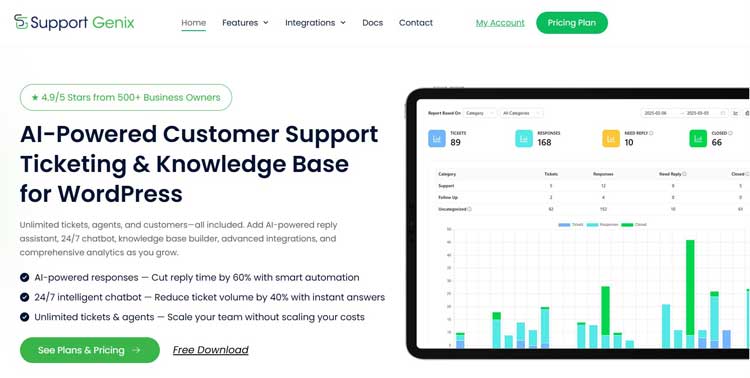
Support Genix fits businesses that want to manage support tickets inside an existing WordPress site. It is not the right choice for every support team.
As of October 2026, its most relevant Free features include unlimited tickets, agents, and customers. Free also provides a customer portal, ticket organization, saved replies, basic WooCommerce support, and basic AI and reporting tools.
Pro adds email-to-ticket, mailbox management, advanced WooCommerce support, conditional fields, more automation, and additional integrations. Email-to-ticket is important if customers contact a shared support address. It converts incoming emails into trackable tickets.
Support Genix still depends on your WordPress environment. You remain responsible for hosting, updates, backups, security, performance, and dependable email delivery.
Free may suit a small team testing portal-based ticketing. Plan for Pro if you need email-to-ticket or advanced store workflows.
Review the current Free and Pro options before making a decision.
A SaaS product may fit better if you need a fully managed platform. It may also suit teams that need channels or controls outside the verified feature set.
Common Selection Mistakes
The biggest mistake is buying from a feature list without testing the real workflow.
- Comparing the first-month price instead of the three-year total.
- Treating maintenance and troubleshooting time as free.
- Assuming self-hosted means no information leaves the site.
- Assuming SaaS includes every channel and integration.
- Forgetting to test incoming and outgoing email.
- Failing to test guest orders, permissions, order lookup, and refunds.
- Ignoring export options until it is time to leave.
Compliance depends on your setup, contracts, data flows, access controls, retention practices, and applicable law. Ask a qualified adviser about specific regulatory obligations.
Moving Between the Two
A migration must cover more than ticket messages. Check contacts, agents, statuses, fields, attachments, notes, timestamps, saved replies, articles, and automations.
- Export the current helpdesk data.
- Confirm that attachments and internal notes are included.
- Map users, fields, statuses, and priorities.
- Import a small test batch.
- Check authors, dates, formatting, files, and ticket threads.
- Test new tickets, replies, permissions, and email routing.
- Keep a protected archive based on your retention policy.
Support Genix lists Fluent Support migration and ticket migration. Confirm supported sources, data types, attachments, custom fields, and limitations before planning a move.
Make Your Decision
The right Self-Hosted vs SaaS Helpdesk choice should fit the business you expect to operate over the next three years. Document your channels, WooCommerce workflow, maintenance capacity, integrations, data needs, and complete budget.
Test one self-hosted option and one SaaS option with the same three requests: an order question, a refund request, and a shipping delay. Compare the number of steps, required tools, agent experience, and total cost before committing.
Frequently Asked Questions
Is a self-hosted helpdesk cheaper than SaaS?
It can be, especially when you already have reliable hosting and the plugin does not charge per agent. It can cost more if you need upgraded hosting, premium email delivery, security tools, development help, or frequent troubleshooting. Compare the complete one-year and three-year totals.
Is a self-hosted helpdesk secure?
It can be secure, but self-hosting does not guarantee security. Protection depends on hosting, updates, access controls, backups, administrator practices, connected services, and recovery planning. SaaS accounts also require careful permissions and security settings. Evaluate the complete setup.
Can I use a helpdesk plugin for WooCommerce support?
Yes, if its WooCommerce integration supports your workflow. Confirm that agents can identify customers, find relevant orders, handle guest purchases, and access the details needed for refunds or shipping questions. Test the process with staging orders before launch.
When does a SaaS helpdesk make more sense?
SaaS makes more sense when you lack technical maintenance capacity or need fast deployment. It also suits teams supporting several websites or requiring channels unavailable in a suitable plugin. The helpdesk can remain accessible during store downtime, although provider availability still matters.
Can I move from SaaS to self-hosted?
Usually, but the result depends on the export and import tools. Check tickets, contacts, attachments, internal notes, fields, timestamps, and conversation threading. Run a test import before cancelling the old service. Confirm how long you can access its data.
Does a self-hosted helpdesk slow down WordPress?
It can, especially as ticket volume, attachments, email jobs, and database queries grow. The effect depends on the plugin, hosting, caching, and database condition. Test performance before and after installation. Monitor storage and upgrade hosting if support activity affects store traffic.