WordPress Ticket Deflection: How to Reduce Support Tickets with KB + AI

Quick Answer: WordPress ticket deflection is a support strategy that uses self-service tools like a knowledge base and an AI chatbot to answer common customer questions before they become support tickets. It’s successful when a customer gets the help they need and no longer requires human assistance.
Your support team shouldn’t have to manually answer the same “how do I reset my password?” or “where is my invoice?” question dozens of times a week. It’s inefficient and consumes support time that agents could spend on complex issues requiring investigation or personalized help.
This article will show you how to build a practical WordPress ticket deflection system. You’ll learn how to combine a well-structured knowledge base, AI-powered assistance, and a clear human escalation path to help customers help themselves.
This isn’t about blocking people from contacting you; it’s about answering routine questions quickly so customers don’t need to open a ticket when self-service can genuinely solve the issue.
Table of Contents
What Is WordPress Ticket Deflection?
At its core, ticket deflection occurs when a customer obtains the information or solution they need through self-service or automated assistance and, therefore, does not need to submit a support ticket.
For a WordPress business, this typically means a customer finds the answer on your documentation site or gets a correct answer from your AI chatbot. The keyword here is “correct.” Ticket deflection is not ticket avoidance, ticket reduction, or automatic ticket closing. It is not about hiding your contact form or making it impossible to reach a human.
Successful deflection is a customer-centric outcome. The customer had a problem. The problem was solved quickly. They didn’t have to wait for a reply. This is distinct from a business-centric outcome where you simply have fewer tickets in the queue because your customers are frustrated or lost.
Why Reduce Repetitive WordPress Support Tickets?
Reducing repetitive tickets isn’t just about cutting support costs. It has a direct impact on the quality of your entire support operation and your business.
- Frees Up Agent Capacity: When your team isn’t flooded with “how-to” questions, they can dedicate their time and expertise to complex bugs, billing disputes, and high-value customers who need personalized help.
- Provides Faster Answers: Your customers don’t want to wait hours for an answer. A searchable knowledge base and AI chatbot can make routine answers available around the clock, often without waiting for an agent.
- Creates Consistent Answers: A well-maintained knowledge base ensures every customer receives the same, approved answer to a common question. This eliminates the risk of different agents providing conflicting information.
- Enables Scalable Support: As your WordPress site or WooCommerce store grows, ticket volume usually grows with it. Ticket deflection allows your support capacity to scale without having to hire a proportional number of new agents.
Which WordPress Support Tickets Can You Actually Deflect?
A critical step in this process is being honest about what should and shouldn’t be deflected. Not every question is a good candidate.
| Good Deflection Candidate | Usually Needs Human Support |
|---|---|
| Password reset and login questions | Payment disputes or chargebacks |
| Standard installation or setup instructions | Security vulnerabilities or concerns |
| Basic configuration questions (“How do I change X setting?”) | Complex bugs requiring investigation |
| Documented billing or policy questions | Account-specific investigation (“Why was my order canceled?”) |
| Common troubleshooting steps (“Have you cleared your cache?”) | Situations requiring access to private customer data |
| Frequently repeated pre-sales questions | Unusual cases with no trustworthy documented answer |
The goal is to deflect tickets that have a clear, documented, and repeatable solution. You should never force an account-specific or sensitive issue into a self-service flow, as this will lead to immense frustration and potentially create a larger problem for your agents to untangle later.
How Does WordPress Ticket Deflection Work?
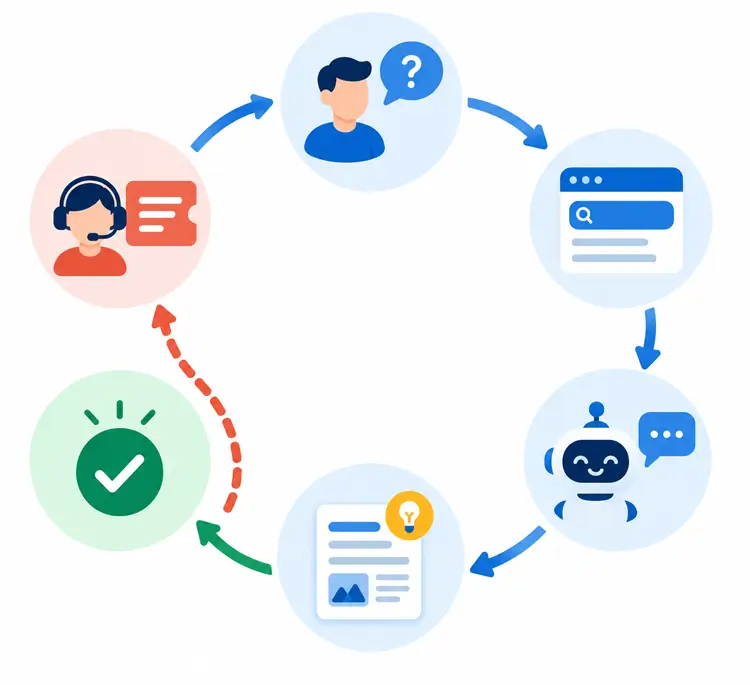
Effective WordPress ticket deflection is not a single tool; it’s a connected workflow. Think of it as a loop that continuously improves over time:
- Build the Knowledge Foundation: Create documentation based on real customer questions.
- Make Documentation Discoverable: Allow users to search and find answers easily.
- Suggest Articles Proactively: Show relevant articles before a user submits a ticket.
- Use AI for Documented Questions: Deploy a chatbot that answers based on your approved knowledge.
- Escalate Unresolved Cases: Provide a clear path for users to reach a human when self-service fails.
- Review and Improve: Analyze failed searches and chatbot conversations to identify knowledge gaps and update your documentation.
Let’s break down each stage.
Step 1: Build a Knowledge Base Around Real Support Questions
Your knowledge base (KB) is the single source of truth for your entire deflection strategy. It powers your searchable help center, your article suggestions, and your AI chatbot. Its quality is paramount.
How to build it effectively:
- Mine Your Existing Data: Look at your past support tickets. What are the 20 most common questions? What issues are your agents explaining over and over again? These are your first articles.
- One Problem Per Article: Each article should solve one specific problem. “How to Change Your Billing Address” is far more effective than a massive “Account Management” guide. It’s easier to search for, link to, and for a user to digest.
- Use the Customer’s Language: Title your article the way a customer would ask the question. Instead of “Performing a Credential Reset,” use “How Do I Reset My Password?”
- Be Clear and Concise: Use step-by-step instructions, numbered lists, and screenshots. Avoid jargon. A non-technical user should be able to follow along without your help.
- Keep It Updated: An outdated article can create additional confusion, so articles should be reviewed whenever products, policies, or workflows change. When agents notice a recurring issue that isn’t documented, write it down.
The quality of your AI chatbot’s answers will be directly tied to the quality of the knowledge you provide it. An AI cannot fix a broken or incomplete knowledge base.
Step 2: Surface Answers Before Customers Submit Tickets
Writing a great article is only half the battle. If customers can’t find it, they will still open a ticket. You need to proactively place answers in their path.
- Powerful Knowledge Base Search: Ensure your help center has a robust search function that understands natural language and synonyms.
- Contextual Article Suggestions: This is a powerful deflection tool. As a user types their question into your contact or ticket form, a smart system can analyze the text and instantly suggest relevant knowledge base articles.
Many times, the user will see their answer before they ever hit “submit.” This is a key feature in a WordPress helpdesk system like Support Genix, which allows you to enable article suggestions in both the chatbot and the ticket form. - In-App or On-Page Help: Consider using tooltips, pop-ups, or links to documentation on relevant pages of your WordPress site, such as the “My Account” page in WooCommerce.
Step 3: Use AI to Answer Questions from Your Knowledge Base
AI can be a significant part of your deflection strategy, but it must be understood correctly.
The correct approach is to use a grounded AI chatbot. A grounded AI chatbot uses your approved knowledge base as the primary source for answering support questions. Instead of relying only on general model knowledge, it retrieves relevant documentation and uses that context to generate a more relevant, verifiable response. This helps keep answers accurate and on-brand.
Example:
- Generic AI: “Plugin settings are usually available under the WordPress Settings menu.”
- Grounded AI: “According to the product documentation, go to WooCommerce → Settings → Accounts & Privacy and enable the relevant account option.”
The AI’s purpose is to make the knowledge base more conversational and faster to use. It is not a replacement for proper documentation. A chatbot that provides incorrect or generic answers will quickly erode customer trust and lead to more tickets, not fewer.
Step 4: Give Customers a Clear Human Escalation Path
This is the most important part of a customer-friendly deflection strategy. You must not trap customers in a chatbot loop.
The ideal workflow should be straightforward:
- User asks the AI chatbot a question.
- The AI provides an answer based on your KB.
- The system asks a simple question: “Did this solve your problem?”
- If yes, the interaction is a successful deflection.
- If no, the system should immediately provide a clear, one-click option to create a support ticket with a human agent.
Ideally, users should have an obvious way to leave the self-service flow and submit a support ticket whenever the answer does not resolve their issue. This escalation path should also be available at all times during the chat. This ensures that the customer always feels heard and supported, even when self-service fails. This “human-in-the-loop” approach is fundamental to building trust.
Step 5: Review Conversations and Find Knowledge Gaps
The process doesn’t end when the user resolves their issue or opens a ticket. This is where the “continuous improvement” loop begins.
Your support system should log all interactions:
- Searches in the KB: What terms are users searching for that return “no results”?
- Chatbot conversations: What questions is the AI failing to answer? When does a user request a human?
- Ticket Data: What is the subject line of tickets that were opened after the user tried self-service?
All of this data points to one thing: knowledge gaps. If dozens of users are searching for “change currency” and failing, that’s a clear signal you need to write an article about it. Reviewing failed searches is especially useful because it shows what customers expected your knowledge base to answer but could not find. Once that article is published and added to the AI’s knowledge source, future queries on that topic can be deflected.
This creates a powerful, self-improving loop:
Recurring Ticket → Identify Knowledge Gap → Create/Update Article → AI/KB Resolves Future Questions → Monitor Results.
A Practical WordPress Ticket Deflection Workflow
Let’s look at a realistic scenario for a WooCommerce store selling digital products.
The Problem: Your support team is flooded with questions about license keys.
The Workflow:
- Customer Query: “I purchased the Pro plugin, but I don’t know where to find my license key.”
- Contextual Suggestion: The customer starts filling out a support ticket. As they type “license key,” the ticket form’s article suggestions immediately suggest two articles: “How to Find Your License Key” and “Activating Your License Key.”
- AI Assistance: The customer instead asks your AI chatbot, “Where is my license key?” The chatbot, using your KB as its support knowledge source, responds with a concise answer: “Your license key is available on your My Account page and was also included in your purchase confirmation email.”
- Resolution: The customer finds the key, solves their problem in under a minute, and never opens a ticket. This is a successful deflection.
The Contrast (Complex Issue):
- Customer Query: “I was charged twice for my order, but I only see one order in my account.”
- AI Assistance: The customer asks the chatbot. The AI doesn’t have a definitive answer for this account-specific billing issue.
- Escalation: The chatbot immediately offers a button: “Get Help from an Agent.” The customer clicks it and creates a ticket.
- Human Support: An agent can now access the customer’s account, investigate the duplicate charge, and issue a refund. This is a correct and necessary escalation.
You can find details in the guide on how to train the AI chatbot with your knowledge base.
How to Measure Ticket Deflection
To know if your efforts are working, you need to track the right metrics. This requires a baseline.
Before implementing any changes, measure your current support volume for a defined period (e.g., 30 days). Record the number of repetitive tickets, KB searches (especially those with no results), chatbot sessions (if any), and escalations.
Then, compare the same metrics after implementing your deflection workflow. Without a baseline, it’s impossible to know if your strategy is working.
- Total Incoming Tickets: The baseline. Track this before and after implementing your deflection strategy.
- Repetitive-Ticket Volume: Is the number of “license key” tickets going down? This is a more meaningful metric than total volume.
- Self-Service Searches: How many searches are performed on your KB?
- Successful Chatbot Answers: How many chatbot conversations end with a positive “Yes, that helped” response?
- Unanswered Chatbot Questions: How often does the AI fail to provide a relevant answer?
- Escalation Rate: What percentage of chatbot interactions result in a ticket? A low escalation rate could mean excellent deflection, or it could mean users are getting frustrated and leaving. A high escalation rate might mean poor deflection or that users prefer human contact.
- Ticket Creation After Viewing an Article: How many people read an article and still open a ticket? This could indicate a poor article.
The Ticket Deflection Rate
This is a helpful, though not standardized, metric. A simple conceptual formula might be:
Ticket Deflection Rate = (Successful Self-Service Interactions / Total Support-Intent Interactions) x 100
The key is to define what constitutes a “successful self-service interaction” for your business. It could be a positive chatbot rating or a resolved KB search. The important thing is to use a consistent internal definition so you can track your performance over time. Don’t chase an industry benchmark that may not exist or apply to your specific situation.
Learn how to add knowledge base articles.
Common Ticket Deflection Mistakes
Avoid these pitfalls, which can turn a good strategy into a customer support disaster:
- Starting with AI Before Fixing Documentation: An AI chatbot with a poor knowledge base is just a fast way to give wrong answers.
- Deflecting Every Question: Forcing complex, account-specific issues into self-service will infuriate customers.
- Creating Thin, Useless FAQ Pages: A hundred low-quality pages that don’t answer real questions are pointless.
- Using Generic Chatbot Responses: If the AI doesn’t answer the specific question, it’s not deflecting; it’s obstructing.
- Ignoring Unanswered Questions: The questions your system can’t answer are your most valuable source of information.
- Measuring Only Ticket Volume: Fewer tickets with lower customer satisfaction is a failure. Track satisfaction alongside ticket numbers.
- No Ownership for Documentation: If nobody is responsible for reviewing outdated articles and recurring gaps, your deflection system will gradually become less reliable.
The cardinal rule is: Good ticket deflection removes unnecessary effort. Bad ticket deflection merely makes support harder to reach.
Support Genix
WordPress Support Ticket Plugin
Take Your Customer Support to The Next Level and Boost Customer Satisfaction Rates
How Support Genix Can Support This Workflow
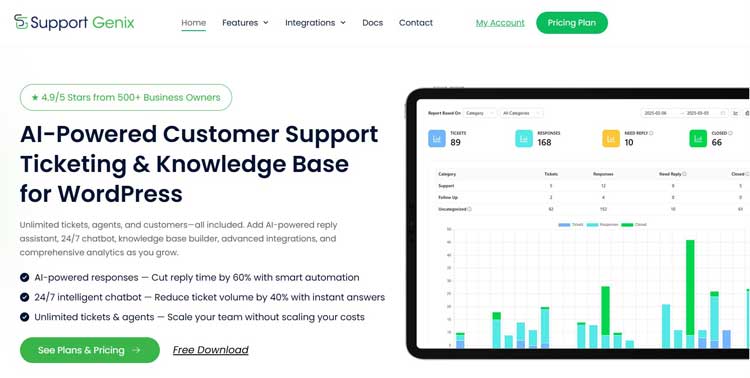
Support Genix brings the knowledge base, AI assistance, article suggestions, ticketing, and conversation-review workflow into the WordPress support environment, making these stages easier to manage together.
Here’s how it maps to the strategy we’ve discussed:
- The Knowledge Foundation: You can create a structured knowledge base for customer self-service directly inside your WordPress dashboard. You can add articles with text, images, and videos, organizing them into categories to make them easy to find.
- AI-Powered Answers: Support Genix includes an AI chatbot you can set up to automate customer support. Critically, you can configure the chatbot to use your knowledge base to ground its answers in your approved documentation.
- Proactive Article Suggestions: You can enable article suggestions in the chatbot and ticket forms. This helps deflect tickets by showing users the answer while they are describing their problem.
- The Improvement Loop: The system allows you to manage and review chatbot conversations, allowing you to spot where the AI struggled and identify the knowledge gaps you need to fill.
- Measure and Improve: Knowledge Base Analytics can show what customers search for, which searches return no results, and which chatbot queries go unanswered. These signals help you identify missing documentation and improve future self-service coverage.
WordPress Ticket Deflection Checklist
Use this checklist to implement your deflection strategy.
- Identify the 20–30 most repetitive support questions from your ticket history.
- Audit your existing documentation for gaps and outdated articles.
- Create or improve knowledge base articles based on your findings.
- Make articles searchable with a user-friendly knowledge base.
- Add contextual article suggestions to your ticket form and chatbot.
- Configure your AI chatbot to use your knowledge base for its answers.
- Define clear escalation rules to ensure customers can always reach a human.
- Review failed searches and chatbot conversations regularly.
- Track your core metrics: repetitive tickets, KB views, escalation rate.
- Assign an owner responsible for the ongoing maintenance of the knowledge base.
Frequently Asked Question
What is ticket deflection in WordPress?
Ticket deflection is the process of helping a user solve their problem through self-service tools (like a WordPress knowledge base or AI chatbot) before they need to submit a support ticket. The key is that the user successfully finds their answer.
How can I reduce support tickets on a WordPress site?
Start by identifying your most common support requests. Create a clear, searchable knowledge base to answer them. Then, implement article suggestions on your ticket form and use an AI chatbot grounded in your documentation to provide instant answers.
Can a knowledge base reduce WordPress support tickets?
Yes, a well-maintained knowledge base is the most important tool for reducing support tickets. It provides a permanent, searchable home for answers to common questions, allowing users to help themselves 24/7.
Can an AI chatbot deflect customer support tickets?
Yes, an AI chatbot is excellent at deflecting repetitive tickets, but only when it is grounded in your approved knowledge base. This ensures it provides accurate answers instead of making things up. It should always offer a clear path to human support for complex issues.
What is a good ticket deflection rate?
A universal “good” rate doesn’t exist, as it varies by industry and audience. Focus on creating a consistent internal definition—such as successful self-service resolutions divided by total support-intent interactions—and then track that rate over time to measure your own improvement.
Which support tickets should not be automated?
You should not try to deflect account-specific issues, payment disputes, security concerns, complex bugs, or any case requiring access to private customer data. These situations require human judgment and empathy.
Does ticket deflection replace human customer support?
No. It is a strategy to complement human support, not replace it. Effective deflection handles repetitive, solvable questions, freeing up human agents to focus on complex, high-value problems that require their expertise.
Conclusion
The ultimate goal of WordPress ticket deflection is not simply to get fewer tickets. It is to create a support ecosystem where simple questions are answered instantly, allowing your human agents to focus on the complex, high-value problems that truly need their expertise.
By building a high-quality knowledge base, using AI to surface those answers proactively, and maintaining a clear path to human support, you can reduce avoidable tickets while giving customers a faster, clearer support experience. It’s about respecting your customer’s time and your team’s expertise.
If you’re ready to build this workflow directly inside WordPress, explore Support Genix’s integrated knowledge base, AI chatbot, article suggestions, and ticket management capabilities to get started.