What’s New in Support Genix? Major Features Added in 2026

Quick Answer: What’s new in Support Genix in 2026? Voice chat, chatbot embedding, and custom AI instructions. It also extended weekend and holiday alerts and added ticket sidebar tools. Knowledge Base pages now load faster on large sites. The built-in Support Genix AI is being retired. You can now connect your own OpenAI or Claude API key.
Support Genix added several notable updates between January and September 2026. Highlights include AI voice chat and chatbot embedding for external websites. Ticket tools and Knowledge Base speed also improved.
These changes give WordPress support teams more flexibility with customer conversations and ticket work. This guide covers each change, when it arrived, and why it matters.
Table of Contents
2026 at a Glance
| Feature | Released | Type | Why it matters |
|---|---|---|---|
| Voice Chat | 20 Jan (1.8.36) | New | Visitors can talk to the chatbot instead of typing. |
| Chat History and Analytics | 20 Jan (1.8.36) | New | Shows conversations, daily trends, peak hours, and helpful rates. |
| Chatbot embed | 26 Jan (1.8.37) | New | Places the chatbot on external websites. |
| Answers from agent replies | 04 Mar (1.8.41) | New | Lets past agent replies inform chatbot answers. |
| Ticket user sidebar tools | 12 Mar (1.8.42) | New | Change or edit the ticket user while handling a ticket. |
| Custom AI instructions | 06 Apr (1.8.44) | New | Guides AI replies, docs and chatbot answers. |
| Weekend and holiday notices | 06 Apr (1.8.44) | Expanded | Adds portal notices and a customer reply email. |
| Own OpenAI or Claude key | 12 Aug (1.8.51) | Changed | Replaces the built-in Support Genix AI. |
| reCAPTCHA Verify, faster Knowledge Base | 06 Sep (1.8.54) | New and improved | Checks keys early and loads Knowledge Base pages faster. |
Some 2026 features build on earlier ones. The AI Chatbot and AI Writing Assistant arrived in May 2025 with version 1.8.18. Weekend and holiday notifications arrived in January 2025 with version 1.8.8. The 2026 releases extend them.
See the AI chatbot setup guide for the original setup.
AI Chatbot and Voice Updates
Voice chat for visitors
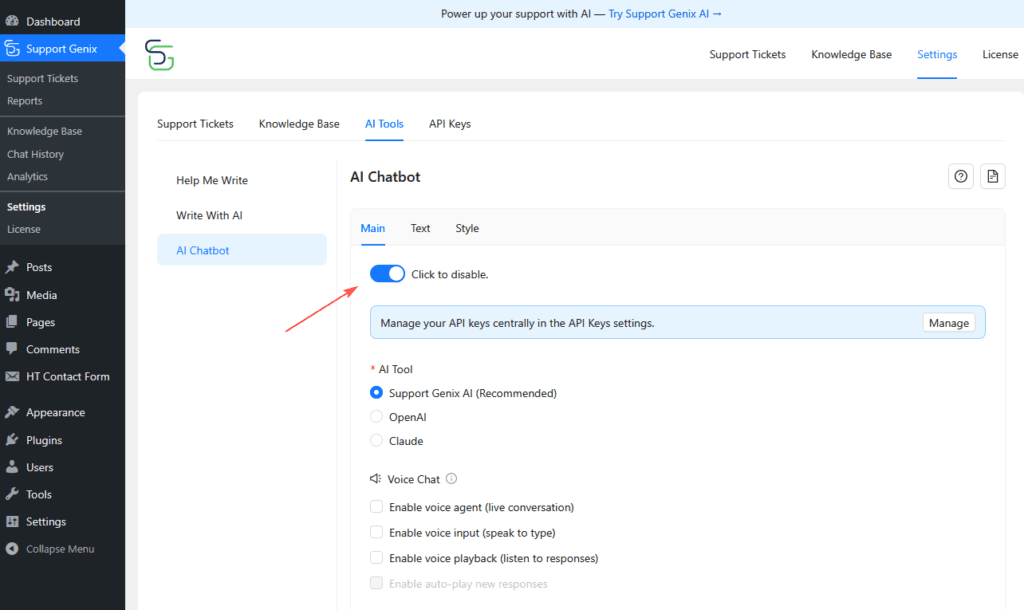
What changed: Version 1.8.36 added Voice Chat, powered by ElevenLabs. It supports push-to-talk input, spoken replies, and live AI voice conversations. Version 1.8.37 added voice session storage.
Why it matters: Visitors who prefer speaking can ask questions without typing. Your team can review past voice sessions from chat history.
Example (hypothetical): A visitor on a phone asks a question by voice. The chatbot answers aloud. Your team reviews the session later in chat history.
Follow the voice chat guide for setup.
Embed the chatbot on any website
What changed: Version 1.8.37 added a chatbot embed script for any external website. Version 1.8.42 added a custom page URL attribute. Version 1.8.44 added a data-custom attribute. Chat sessions now show whether a chat began on the main site or an embed. They also show the page URL where it started.
Why it matters: You can offer the same chatbot where visitors already are. Session details show where each conversation began.
Example (hypothetical): A software company runs its product site and help center separately. It embeds the chatbot on the product site. It then checks which page each chat started from.
The chatbot embed guide shows the setup.
Control what the chatbot knows
What changed: Three updates give you more control over chatbot answers:
- Restrict specific knowledge bases and categories as chatbot sources (1.8.37).
- Let the chatbot answer from agent replies in past tickets (1.8.41).
- Add custom AI instructions for AI Ticket Reply, AI Docs Writer, and the chatbot (1.8.44).
Why it matters: Restrictions keep answers tied to approved content. Agent replies add real support answers as a source. Custom instructions let you guide tone and style.
Example (hypothetical): A team gets the same troubleshooting question every week. It enables agent-reply answers so the chatbot can draw on past fixes. It also adds an instruction to keep replies short and polite.
Agent replies can hold names or private details. Review access and privacy settings before you enable that source.
Learn how to train the AI chatbot with your Knowledge Base.
Chat history, analytics and starred chats
Version 1.8.36 added Chat History and Analytics. It tracks conversations, daily trends, peak hours and helpful rates. Version 1.8.40 added starred chats. Starred chats are kept when old history is cleaned up. The data shows how visitors use the chatbot.
See how to manage and review chatbot conversations.
WooCommerce order history lookup
Version 1.8.41 added order history lookup by customer email. It does not require an order ID.
See the WooCommerce integration page for details.
Support Genix AI Is Retiring: Bring Your Own Key
Version 1.8.36 introduced Support Genix AI, with free credits and no API keys. Version 1.8.51 announced that it is being retired and will be discontinued soon. The changelog gives no end date.
This affects the hosted service only. The AI features themselves continue. You add your own OpenAI or Claude API key in Settings > API Keys. The key powers AI Ticket Reply, AI Docs Writer, and the AI Chatbot.
Version 1.8.51 also fixed a chatbot that did not answer visitors in some setups. Follow the API keys setup guide. The Support Genix AI documentation covers the older option.
Ticket Handling Updates for Agents
- Change the ticket user from the ticket details sidebar (1.8.42).
- Edit ticket user info from the same sidebar (1.8.42).
- See user custom fields in the sidebar (1.8.42).
- See who is viewing a ticket with the current viewers indicator (1.8.40).
- Give agents a Change ticket user permission when they create tickets (1.8.38).
Why it matters: When several agents work on tickets, the current viewers indicator shows who is looking at a ticket. This gives agents more visibility into ongoing activity. The sidebar tools let agents fix user details without leaving the ticket.
Example (hypothetical): An agent creates a ticket for a customer under the wrong user. The agent switches the ticket user from the sidebar. The support agent guide covers daily ticket work.
Email and Notification Updates
What changed: Weekend and holiday settings first arrived in 2025. Version 1.8.44 extended them. It added notices on login and register pages. It also added a holiday email when a customer replies. The portal notice now supports rich text. These settings are a Pro feature.
New email template placeholders cover ticket track ID, priority, and assigned user. Email templates now use inline CSS for better rendering across email clients. Version 1.8.45 improved email content rendering again. Version 1.8.42 improved Outlook quote detection for email-to-ticket, a Pro feature.
Why it matters: Customers see when your team is away. Cleaner emails read better across email clients.
Example (hypothetical): On a public holiday, a customer opens the login page and sees your notice. After replying, the customer gets a holiday email.
See the email notification templates page.
Integration and Webhook Updates
Version 1.8.42 simplified settings for WooCommerce, Envato, and Elite Licenser. It fixed support expiry checks for Envato and Elite Licenser. Outgoing webhooks now include user custom fields. They use field slugs as custom field keys. The older format is still supported. The same release fixed wrong event names for ticket reply and close.
Teams that send ticket data to other tools now get more user context. Webhook integration is a Pro feature.
Read about the Webhook integration.
Speed and Performance Updates
- Knowledge Base archive and article pages load faster on large sites (1.8.54).
- The ticket list loads faster (1.8.47).
- Replies with large content render faster (1.8.47).
- Ticket details pages load more smoothly during navigation (1.8.44).
Faster pages matter most on busy help desks and large documentation libraries. Visit the Knowledge Base page to see the module.
Security and Compatibility Updates
- Guest ticket link authentication and token generation were hardened (1.8.53).
- Access control and file handling were hardened (1.8.48).
- File upload and download validation improved (1.8.45).
- The support portal, AI Chatbot, and Knowledge Base now load on Plain permalink sites (1.8.54).
- A Verify button checks reCAPTCHA v3 keys before they block visitors (1.8.54).
- WPML and Polylang compatibility improved (1.8.38).
- Translation coverage and locale handling improved (1.8.45).
- A Classic UI view mode arrived for Knowledge Base screens (1.8.38).
The 1.8.48 fixes came from responsible disclosures by outside researchers. The reCAPTCHA setup guide explains the new Verify button.
Who Should Care About These Updates
- WooCommerce stores: order history lookup and simpler settings.
- SaaS and product teams: chatbot embed, agent-reply answers, and custom AI instructions.
- Larger support teams: current viewers, change ticket user, and a faster ticket list.
- Envato and digital product sellers: simpler Envato and Elite Licenser settings and fixed expiry checks.
- Multilingual sites: better WPML and Polylang compatibility and wider translation coverage.
- Teams with days off: weekend and holiday notices and emails.
Comparing every WordPress helpdesk plugin? Use this list as a checklist.
Our guide to WordPress ticket system plugins covers more options.
What to Consider Before Updating Support Genix
- Optional features: Voice chat, embeds, and agent-reply answers are optional. Enable only what fits your workflow.
- API keys: AI features need your own OpenAI or Claude key now. Your AI provider sets its own usage terms.
- Data handling: Optional AI and third-party services may send data outside your site when enabled.
- Editions: Some features are Pro. The free plugin has a shorter list.
- Safe updating: Back up your site and test on staging first. Apply security releases promptly.
Support Genix
WordPress Support Ticket Plugin
Take Your Customer Support to The Next Level and Boost Customer Satisfaction Rates
Support Genix 2026 Release Table
The table below lists the Support Genix releases documented between January and September 2026.
| Version | Date | Main changes |
|---|---|---|
| 1.8.54 | 06 Sep 2026 | reCAPTCHA v3 Verify button; Plain permalink fix; faster Knowledge Base pages |
| 1.8.53 | 27 Aug 2026 | Guest ticket link security hardening; WordPress compatibility tested |
| 1.8.52 | 19 Aug 2026 | Fixes for ticket list, ticket creation and statistics in certain server setups |
| 1.8.51 | 12 Aug 2026 | Support Genix AI retirement notice; own OpenAI or Claude key; chatbot response fix |
| 1.8.48 | 13 Jul 2026 | Access control and file handling hardened |
| 1.8.47 | 16 Jun 2026 | Faster ticket list and reply rendering; text color and alignment fix |
| 1.8.46 | 24 May 2026 | Performance and stability; WordPress compatibility tested |
| 1.8.45 | 30 Apr 2026 | Closed-ticket reply handling; translation coverage; upload validation; email rendering |
| 1.8.44 | 06 Apr 2026 | Custom AI instructions; weekend and holiday notices; new email placeholders; data-custom attribute |
| 1.8.43 | 15 Mar 2026 | Performance and stability fixes |
| 1.8.42 | 12 Mar 2026 | Ticket user sidebar tools; webhook updates; simpler integration settings |
| 1.8.41 | 04 Mar 2026 | Chatbot answers from agent replies; chat session details; order history lookup |
| 1.8.40 | 18 Feb 2026 | Starred chats; current viewers indicator; WooCommerce order ticket fix |
| 1.8.39 | 16 Feb 2026 | Performance and bug fixes |
| 1.8.38 | 09 Feb 2026 | Classic UI for Knowledge Base; Change ticket user permission; WPML and Polylang |
| 1.8.37 | 26 Jan 2026 | Chatbot embed; chatbot knowledge restrictions; voice session storage |
| 1.8.36 | 20 Jan 2026 | Support Genix AI; Voice Chat; Chat History and Analytics |
Frequently Asked Questions
What’s new in Support Genix in 2026?
Support Genix added voice chat, chatbot embedding, and custom AI instructions. It also extended holiday alerts, added ticket sidebar tools, and sped up Knowledge Base pages.
Is Support Genix AI still available?
Support Genix AI is being retired, according to the version 1.8.51 notice. The AI features continue with your own API key.
Do I need my own API key for Support Genix AI features?
Yes. Add your own OpenAI or Claude key in Settings > API Keys. It powers AI Ticket Reply, AI Docs Writer, and the AI Chatbot.
Can I use the chatbot on an external website?
Yes. The embed feature added in version 1.8.37 lets you use the chatbot on any external website.
Does Support Genix have voice chat?
Yes. Version 1.8.36 added Voice Chat powered by ElevenLabs. It supports push-to-talk input, spoken replies, and live voice conversations.
Were the AI chatbot and holiday alerts new in 2026?
No. The AI Chatbot arrived in May 2025 and weekend and holiday notifications in January 2025. The 2026 releases extended both.
Final Thoughts
Support Genix spent 2026 on AI conversations, ticket handling, and speed. If you run a WordPress support desk, start with the features that fit your workflow. Use the Free vs Pro comparison to match them to your edition.