How to Handle Angry Customers: 7 Practical Steps for Support Teams

Quick Answer: To handle angry customers effectively: stay calm, listen without interrupting, acknowledge their feelings, apologize sincerely, ask clarifying questions, offer a clear resolution, and follow up. These seven steps help your team de-escalate tension, rebuild trust, and turn a frustrated customer into a loyal one.
An angry customer lands in your support queue. Their message is in all caps. They’re threatening a chargeback and saying they’ll never buy from you again.
What happens in the next five minutes matters more than almost anything else in your support operation.
Handle it well, and you can turn that person into one of your most loyal customers. Handle it poorly, and you risk losing them — along with everyone they tell.
TL;DR: Angry customers want to feel heard before they want to be fixed. Lead with empathy, confirm you understand the problem, then solve it. The 7 steps below give your support team a repeatable process to do exactly that — every time.
Table of Contents
Why Customers Get Angry in the First Place
Most customers don’t contact support because they’re having a great day. They reach out because something broke, something didn’t arrive, or something didn’t work as expected.
The frustration you’re seeing usually isn’t personal — it’s about the gap between what they expected and what they got.
According to research by Qualtrics, 43% of consumers say they stopped doing business with a brand after a single poor service experience. The stakes are real.
Common triggers in eCommerce and WordPress/WooCommerce environments include:
- Delayed or missing orders — especially frustrating after payment has cleared.
- Products that don’t match the description or arrive damaged.
- Plugin conflicts or technical issues after purchasing digital products.
- Billing errors — unexpected charges, failed refunds, or duplicate transactions.
- Slow or no response from support — customers who feel ignored escalate fast.
- Being transferred between agents without resolution — having to repeat yourself is one of the top frustration drivers.
Understanding these triggers helps you build faster, more empathetic responses — and fix the root issues before they create repeat complaints.
The Real Cost of Getting It Wrong
Angry customers who don’t get good support don’t just leave quietly.
According to data compiled by AmplifAI (2026), poor customer experiences now put an estimated $3 trillion in global sales at risk. Customers who have a bad experience will share it with an average of 9–15 people, while happy customers typically tell just 4–6.
For WooCommerce store owners, where customer lifetime value and word-of-mouth referrals drive growth, losing even a handful of loyal customers compounds quickly.
The good news: customers who experience a failure followed by exceptional recovery often become more loyal than customers who never had a problem at all. Researchers call this the service recovery paradox — and it means every angry support ticket is actually an opportunity.
How to Handle Angry Customers: 7 Practical Steps
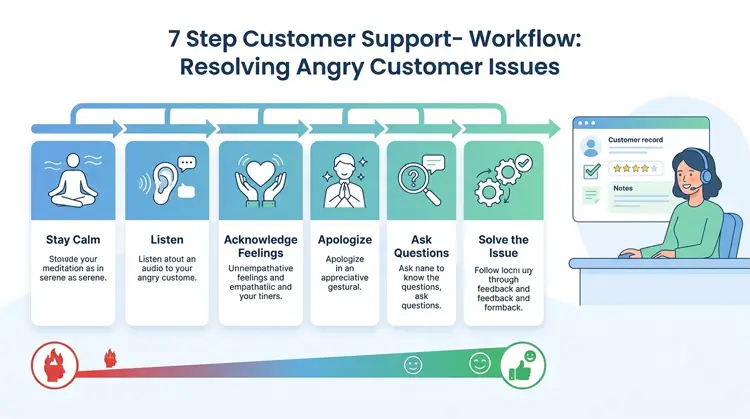
Step 1: Stay Calm and Regulate Yourself First
The first step in how to handle angry customers is managing your own reaction before anything else
When you read a hostile message or take an angry call, the natural instinct is to defend or deflect. Both make things worse.
Instead, take a breath before you type a single word. Slow your speech on calls. Lower your tone. Calm is contagious — and so is tension.
In practice for WooCommerce support teams: Encourage agents to read the full ticket before responding. Rushing to reply without understanding the complete complaint leads to more back-and-forth that makes the customer angrier — and takes up more of your team’s time.
Step 2: Let Them Speak — Don’t Interrupt
Once a customer is venting, the worst thing you can do is cut them off.
Even if they’re wrong. Even if the facts are off. Even if you already know the solution.
Interrupting signals that you’re not really listening — that you’re just waiting for your turn to talk. That invalidates their experience and almost always makes the interaction harder to recover.
Let them say everything they need to say. Use brief signals of acknowledgment: “I understand,” “I can see why that would be frustrating,” or simply staying attentive without rushing them along.
On live chat or a ticket system, resist the urge to send a templated “we’re looking into it” message until you’ve actually read and understood the full complaint.
Step 3: Acknowledge Their Feelings Before Solving the Problem
This is the step most support agents skip — and it’s the most important one.
Customers who don’t feel heard will reject even the correct solution. You can offer a full refund and still lose the customer if they feel like you dismissed their frustration.
Acknowledge the emotion first. Name it. Validate it.
Try these instead of a generic “sorry for the inconvenience”:
- “I completely understand why you’re frustrated — that’s not the experience we want you to have.”
- “I can see this has caused a real inconvenience, and I’m sorry for that.”
- “You’re right — that should have worked, and it didn’t. I get why that’s upsetting.”
You’re not accepting blame for something outside your control. You’re showing the customer that a real person is on the other side of this — one who actually cares.
Step 4: Apologize Sincerely — Even When It’s Not Your Fault
A genuine apology doesn’t mean admitting fault for things outside your control. It means acknowledging that the customer had a bad experience.
There’s an important difference:
- ❌ “I’m sorry you feel that way.” — dismissive, puts the problem on the customer
- ✅ “I’m sorry this happened — let me make it right.” — empathetic and action-oriented
The first version implies the customer’s feelings are the problem. The second acknowledges the situation and signals you’re moving toward a solution.
Balance the apology with forward momentum. Excessive apologizing without action sounds hollow. Keep it simple: “I’m sorry this happened. Here’s exactly what I’m going to do about it.”
Step 5: Ask Questions to Understand the Real Issue
Once emotions are acknowledged, it’s time to understand what actually happened.
Ask specific, open-ended questions:
- “Can you walk me through exactly what happened?”
- “When did you first notice the issue?”
- “What were you expecting to happen?”
Avoid yes/no questions — they don’t give you enough context to solve the problem properly. And avoid assumptions. A customer complaining about a “broken product” might mean it arrived damaged, isn’t working as advertised, or is missing a feature they expected.
For WooCommerce-specific tickets: Ask for the order number, product version, plugin configuration, WordPress version, and any error messages. Having this upfront prevents delays and shows the customer you’re taking the issue seriously.
Once you have the facts, paraphrase back what you heard to confirm your understanding:
“So to make sure I’ve got this right — you ordered [product] on [date], it arrived damaged, and you’ve been trying to reach us for two days without a reply. Is that correct?”
This step alone dramatically reduces misunderstandings — and shows the customer you were actually listening.
Step 6: Offer a Clear, Concrete Resolution
Now you can solve the problem.
Don’t offer vague reassurances. Don’t say “we’ll look into it.” Give the customer a specific, actionable resolution with a clear timeline:
- “I’m processing a full refund to your original payment method. It will appear within 3–5 business days.”
- “I’m escalating this to our technical team personally and will follow up with an update by tomorrow at noon.”
- “I’m sending a replacement right now — here’s your tracking number.”
Where possible, offer options. Giving customers a choice — refund vs. replacement, for example — restores a sense of control, which is something angry customers have often lost.
If you can’t fully resolve the issue on first contact, set clear expectations. Avoid overpromising. A broken promise resets the customer’s frustration to a higher baseline than before they complained.
Escalation matters too. Some tickets need a senior agent or manager. Know your escalation path and use it clearly. Customers should feel upgraded, not passed off.
For more guidance on structuring replies, see our guide on tips for writing effective support ticket replies.
Step 7: Follow Up to Close the Loop
Most support teams resolve the ticket and consider the job done. The best teams follow up.
A short follow-up message — even just one line — after a resolution shows the customer that they weren’t just a problem to be closed. It shows you actually care whether the solution worked.
Something like:
“Hi [Name], just checking in to make sure the refund came through and everything is resolved on your end. Let us know if there’s anything else we can help with.”
This single step does three things:
- Confirms the resolution actually worked
- Demonstrates genuine care beyond the transaction
- Creates an opportunity to collect positive feedback from a recovered customer
According to Bain & Company research, increasing customer retention by just 5% can boost profits by 25–95%. A follow-up message is often what tips the balance between a customer who churns and one who comes back.
Support Genix
WordPress Support Ticket Plugin
Take Your Customer Support to The Next Level and Boost Customer Satisfaction Rates
Handling Angry Customers in WooCommerce: A Real-World Example
Here’s a scenario that support teams at WordPress/WooCommerce businesses face regularly.
The situation: A customer emails after purchasing a premium plugin. They’ve spent two hours trying to install it, it keeps throwing errors, and their site is now showing a white screen. They’ve tried contacting support three times with no response.
Where most teams fail: They respond with a generic template, ask the customer to re-explain everything, or send a FAQ link without addressing the emotional side of the interaction.
What good support looks like:
- The ticket opens with: “Hi [Name], I’m [Agent] from the support team. I can see you’ve been waiting and I’m sorry for the delay — that’s not acceptable. Let’s fix this right now.”
- The agent asks for WP version, PHP version, the error log, and the active theme — the specifics that actually matter.
- All communication stays in one thread, with a clear resolution or escalation path.
- 24 hours after resolution, a follow-up message confirms the plugin is working.
This kind of consistency only happens when your team has a proper support ticket system keeping everything organized.
Support Genix is built specifically for WordPress and WooCommerce stores. It gives your team a centralized ticket dashboard, automated email notifications, WooCommerce order integration, and custom fields — so agents always have the context they need before they reply. See how the WooCommerce integration works →
How a Ticketing System Prevents Angry Customers
Many escalations are preventable. Anger builds when customers feel ignored, responses are slow, or they have to repeat themselves across multiple channels.
A structured ticketing system addresses all three.
| Without a Ticketing System | With Support Genix |
|---|---|
| Tickets get buried in shared inboxes | Every ticket is logged, assigned, and tracked |
| Customers repeat themselves to different agents | Full conversation history visible to every agent |
| No response time tracking or SLA | Priority levels, due dates, and status labels |
| No follow-up process | Automated notifications and ticket status updates |
| Hard to spot recurring issues | Reporting reveals patterns and repeat complaints |
For small support teams running WooCommerce stores, this kind of structure isn’t a luxury — it’s what makes consistent, empathetic support possible at scale.
If you’re building your support system from scratch, our step-by-step guide to creating a support ticketing system in WordPress is a good starting point.
Training Your Team to Handle Angry Customers
The 7-step framework above is most effective when it’s practiced — not just read once.
Use Real Tickets as Training Material
Anonymize past difficult tickets and walk through them as a team. Identify where the response could have been more empathetic, faster, or more specific. This builds shared language and standards.
Role-Play Before It’s Live
Have agents practice with a manager playing an angry customer. The goal isn’t to train a script — it’s to build comfort with discomfort. Knowing what it feels like to stay calm under pressure makes it easier to do in real conversations.
Create Templates — But Train Agents to Customize Them
Templates save time, but rigid scripts frustrate customers. Build templates around the structure (acknowledge → apologize → ask → solve → follow up) and let agents adapt the language to the situation.
Debrief After Hard Tickets
After a difficult interaction, take five minutes to review what happened with the agent involved. What worked? What would they do differently? This builds institutional knowledge and helps prevent burnout.
What Not to Do When Handling Angry Customers
Just as important as what to do:
- Don’t say “calm down” — it almost always has the opposite effect
- Don’t lead with “that’s our policy” — without context or empathy, it reads as dismissal
- Don’t get defensive — even if the customer is factually wrong
- Don’t transfer without context — brief the next agent fully before the customer has to repeat themselves
- Don’t ignore public complaints — a complaint on social media needs a public acknowledgment first, then move to a private channel
- Don’t close the ticket before confirming the customer is satisfied
When the Situation Becomes Abusive
Most angry customers are frustrated, not abusive. But sometimes a customer crosses a line.
In those cases:
- Name it calmly: “I want to help you resolve this. But I need us to keep the conversation respectful so I can focus on doing that.”
- Give a clear warning: Let the customer know you’ll need to pause the interaction if the language continues.
- End it if necessary: You can close a live chat or put a call on hold if a customer is abusive. Follow up in writing with a calm explanation and a clear path to resolution.
Your agents have a right to a safe work environment. Setting a boundary isn’t refusing to help — and it’s a skill worth building into your team training.
Frequently Asked Questions
What is the best way to handle an angry customer?
Lead with empathy before problem-solving. Stay calm, let the customer speak without interruption, acknowledge their frustration, offer a genuine apology, ask clarifying questions, then provide a specific and actionable resolution. Following up after the resolution significantly improves the chance of recovering the relationship.
How do you de-escalate an angry customer quickly?
The fastest way to de-escalate is to make the customer feel genuinely heard. Name their emotion (“I can see this has been really frustrating”), avoid defensive language, and move quickly to a concrete next step. Customers calm down faster when a real person is clearly taking ownership of their issue.
What should you never say to an angry customer?
Avoid: “Calm down,” “That’s our policy,” “There’s nothing I can do,” and “I understand how you feel” said without any follow-up action. These phrases signal dismissal and usually make the situation worse. Replace them with empathetic, action-oriented language that shows you’re actively working on a solution.
How do you handle angry customers in a WooCommerce store?
Prioritize fast, organized responses through a ticketing system. When a customer contacts you about an order, payment, or product issue, pull up the order history before replying so your agent has full context. Acknowledge the frustration, ask for specific details (order number, product version, error messages), and offer a concrete resolution — refund, replacement, or technical fix — with a clear timeline.
How do you handle an angry customer over email or support tickets?
Read the full message before responding. Identify every issue raised and address each one explicitly. Structure your reply as: empathy → specific acknowledgment of each issue → concrete resolution → timeline → direct contact method for follow-up. A quick “we’re looking into it” reply that doesn’t address the actual problem triggers another round of frustration.
What causes customers to become angry with support teams?
The most common triggers are slow response times, being transferred between agents without resolution, having to repeat the same information multiple times, vague or unhelpful replies, and feeling like they’re talking to a script rather than a person. Systemic issues — like no ticketing system or poor team training — are often the real root cause.
How can a support ticketing system help with angry customers?
A structured ticketing system like Support Genix prevents many escalations by ensuring no ticket is missed, every agent can see the full conversation history, and response times are tracked. When customers feel their issue is being managed — not ignored — they’re far less likely to escalate. Learn more on the Support Genix knowledge base →
Conclusion
Angry customers are inevitable. But they’re also one of your biggest opportunities.
Every escalated ticket is a chance to show that your business actually stands behind what it sells — not just with words, but with fast, genuine, human-centered support.
The 7 steps in this guide give your team a repeatable process: stay calm, listen fully, acknowledge the emotion, apologize sincerely, ask the right questions, deliver a concrete solution, and follow up. Done consistently, this approach doesn’t just resolve issues — it rebuilds trust.
For WordPress and WooCommerce store owners, the right tools behind your team matter just as much as the skills they bring to each interaction. A proper ticketing system keeps nothing falling through the cracks and gives your agents the context they need to handle every ticket with confidence.
Ready to build a support operation that handles even the hardest tickets better? Explore Support Genix →