Customer Service Workflow Automation: A Practical Guide for Support Teams

If your team spends too much time answering the same order-status question, reassigning tickets manually, or chasing overdue replies, customer service workflow automation can remove a lot of that operational drag.
The goal is not to replace your team; it is to automate repeatable support steps so agents can spend more time on complicated, emotional, or high-value conversations.
That distinction matters. Support automation usually works best when it handles predictable actions in the background, while human agents stay available for edge cases, billing disputes, technical troubleshooting, and frustrated customers who need judgment rather than a script.
Quick Answer: What Is Customer Service Workflow Automation?
Customer service workflow automation means using rules, templates, AI assistance, and support software to handle repeatable support tasks automatically. A typical workflow can identify the issue, tag the ticket, route it to the right queue, send an automated customer service response, suggest help articles, and escalate unusual cases to a human agent.
Table of Contents
What Is Customer Service Workflow Automation?
Customer service workflow automation is a structured way to move a support request from intake to resolution using rules and software. Instead of relying on someone to read every message, decide where it belongs, send the same first reply, and remember follow-ups, the system performs those routine steps automatically.
Here is how it differs from similar terms:
- General customer service automation: A broad category that can include chatbots, self-service, email sequences, and workflow rules.
- Automated customer responses: One small part of automation, usually limited to instant acknowledgments, status updates, or saved replies.
- AI chatbots: Chat interfaces that answer questions or collect intent, often before a ticket reaches an agent.
- Help desk ticketing: The system that stores and tracks requests as tickets; automation sits on top of that process.
- Knowledge base automation: Using search, article recommendations, analytics, or AI-assisted documentation to help customers solve issues without opening a ticket.
Support Genix
WordPress Support Ticket Plugin
Take Your Customer Support to The Next Level and Boost Customer Satisfaction Rates
How Does Customer Service Workflow Automation Work?
In most teams, the workflow follows a simple pattern:
- A customer submits a request through email, chat, a form, WhatsApp, or a ticket portal.
- The system detects the topic using keywords, categories, forms, or AI intent recognition.
- The request is tagged, prioritized, and routed to the right queue or agent.
- The customer receives an automated assistance message, confirmation, or next-step update.
- Repetitive tasks such as reminders, internal assignments, and article suggestions happen automatically.
- Complex cases are escalated to a human when the issue is sensitive, unclear, or outside the workflow rules.
- Analytics show where the workflow fails, where response times slip, and which topics should be added to the knowledge base.
This is how a well-built customer support ticketing system should function: fewer manual handoffs, faster first responses, and a clear escalation path when automation is not enough.
Customer Service Workflow Automation Examples
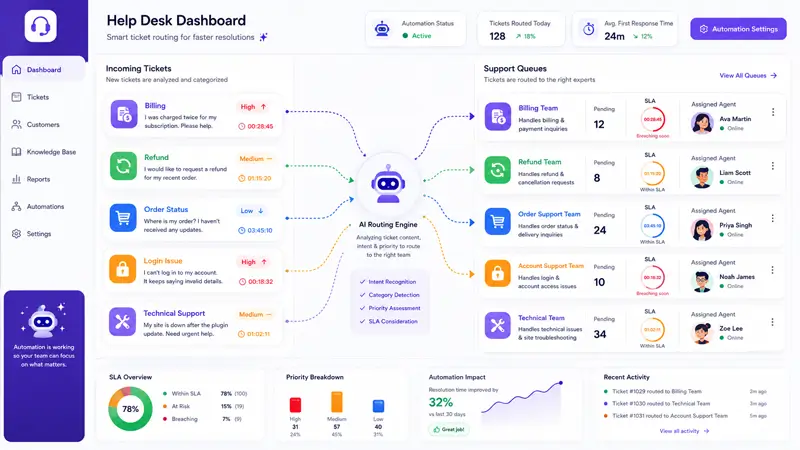
Below are practical customer service automation examples that support teams use every day.
1. Automated ticket routing
Trigger: A customer selects a category or uses keywords like “refund,” “login,” or “billing.”
What gets automated: The system tags the request and assigns it to the right team or specialist.
When a human should step in: When the issue spans multiple teams or the customer message is unclear.
Why it helps: It cuts triage time and reduces internal handoffs. Teams using a ticketing system with auto-assignment typically see fewer misdirected tickets and faster first replies.
2. Customer service automated responses
Trigger: A new ticket is created.
What gets automated: The customer gets an acknowledgment, expected timeline, and links to relevant help content.
When a human should step in: If the reply needs context, reassurance, or account-specific guidance.
Why it helps: Customers know their message was received, which reduces uncertainty and repeat follow-ups.
3. SLA-based escalation
Trigger: A ticket remains unanswered or unresolved beyond the target time.
What gets automated: Internal alerts, priority changes, or reassignment rules.
When a human should step in: As soon as the deadline risk affects a real customer outcome.
Why it helps: Prevents urgent tickets from sitting unnoticed in a busy queue. Understanding what a Service Level Agreement means in practice helps teams set these rules effectively.
4. Knowledge base article suggestions
Trigger: A user searches the help center or opens a ticket about a common problem.
What gets automated: The system suggests help articles before or during ticket creation.
When a human should step in: If the article does not solve the problem or the customer has already tried it.
Why it helps: A well-maintained customer service knowledge base can deflect a significant share of simple tickets. AI-powered knowledge bases reduce support tickets by up to 40% across all interactions, according to Support Genix’s own documentation.
5. Order status automation
Trigger: A shopper asks where an order is.
What gets automated: The system sends status details or surfaces order information from the ecommerce platform.
When a human should step in: If the order is missing, damaged, delayed unusually, or tied to a refund dispute.
Why it helps: Order-status questions are high-volume and usually predictable, which makes them a strong first workflow to automate. For WooCommerce stores, connecting a WooCommerce helpdesk integration to the support system makes this practical without custom development.
6. Refund request workflow
Trigger: A customer selects “refund” on the support form.
What gets automated: The request is categorized, the customer receives a first-response message, and the ticket moves to billing or store operations.
When a human should step in: For exception requests, policy disputes, fraud concerns, or angry complaints.
Why it helps: It standardizes the first steps without letting sensitive decisions run fully unattended.
7. AI-assisted reply suggestions
Trigger: An agent opens a ticket that matches known patterns.
What gets automated: The system drafts a suggested response or summarizes prior context.
When a human should step in: Always before sending anything important, especially on emotional or technical issues.
Why it helps: It speeds up repetitive writing while keeping a person in charge of the final answer. Support Genix includes an AI-powered reply assistant for help desk agents to handle exactly this.
8. Unresolved ticket reminders
Trigger: A ticket is waiting too long for an agent, customer, or internal team.
What gets automated: Reminder emails, status nudges, or dashboard alerts.
When a human should step in: If the customer is frustrated or the case is stuck between teams.
Why it helps: It prevents tickets from slipping through the cracks.
Customer Service Workflow Examples for WordPress, WooCommerce, and SaaS Teams
WooCommerce Store Example
A mid-size WooCommerce store receives four main ticket types: order status, refunds, product questions, and login issues. With workflow automation in place:
- Order status tickets are automatically replied to with live order data pulled from WooCommerce.
- Refund tickets are tagged, given a first response, and routed to the billing queue.
- Product questions trigger a knowledge base article suggestion before assigning to an agent.
- Login issues go to technical support with the relevant troubleshooting doc attached.
- Tickets with high-frustration language or multiple replies without resolution get escalated automatically.
For WordPress-based stores, Support Genix handles this end-to-end ticket management,
WooCommerce integration, saved replies, knowledge base suggestions, and analytics without requiring separate tools stitched together.
SaaS Team Example
A SaaS company segments tickets by type: technical issues → engineering queue; pricing questions → billing queue; how-to questions → knowledge base first, then support. SLA rules escalate any technical ticket that is open for more than four hours without a response. Sentiment detection flags frustrated users for priority handling.
Shared First Step
In both scenarios, the single most impactful first automation is the same: automatic ticket tagging and routing based on category or keywords. It requires no AI, no complex configuration, and delivers visible results within days of setup.
Benefits of Customer Service Workflow Automation
The data behind automation is credible and specific:
- 92% of customer service leaders say AI has helped improve response times (QueryPal, 2026).
- Service reps using AI tools spend 20% less time on routine cases, freeing roughly four hours per week per agent (Salesforce State of Service, 2026).
- AI is now estimated to resolve 30% of customer service cases, with that figure projected to reach 50% by 2027 (Salesforce).
- Organizations using automation report a 25–40% reduction in agent workload (Industry benchmarks, 2026).
- AI-powered knowledge bases can reduce support ticket volume by up to 40% when properly maintained (Support Genix documentation, 2026).
Beyond the numbers, the operational benefits usually show up in predictable ways:
- Faster first responses because acknowledgments, routing, and template replies happen in seconds, not hours.
- Fewer repetitive tasks because agents stop re-doing the same classification and update work on every shift.
- Better ticket organization because categories, queues, and escalation rules are applied consistently rather than depending on individual agents.
- More consistent customer communication because saved replies and notification rules reduce variation across your team.
- Stronger self-service because relevant articles appear before an agent has to reply manually.
- Clearer reporting because ticket metrics, article gaps, search terms, and satisfaction signals are all visible in one place.
Pros and Cons of Automated Customer Service
| Area | Pros | Cons |
| Speed | Customers get instant acknowledgments, routing, and updates. | Fast replies can still feel unhelpful if the workflow is poorly designed. |
| Consistency | Templates and rules keep responses and processes more uniform. | Over-standardized replies can sound generic or impersonal. |
| Scalability | Teams can handle more repetitive tickets without adding the same amount of headcount. | More volume can expose workflow gaps if no one reviews failures regularly. |
| Agent workload | Repetitive tasks move out of the queue so agents can focus on complex cases. | Teams may trust automation too much and miss nuance in unusual tickets. |
| Routing | Requests reach the right person faster when categories and rules are accurate. | Misclassification can send customers into the wrong queue and delay resolution. |
| Customer experience | Good automation reduces wait time and creates a clearer process. | Sensitive issues still need a human, and hiding that option can frustrate customers. |
What Should You Automate First?
Start with low-risk, repetitive workflows that already follow a predictable pattern. Good early candidates include ticket tagging, first-response messages, order-status questions, knowledge base suggestions, internal assignment, follow-up reminders, and simple FAQ-based replies.
Do not start by automating the most sensitive work. Angry complaints, billing disputes without review, complicated technical problems, high-value customer conversations, and account-specific issues with risk or privacy implications should stay human-led, even if AI or workflow rules assist in the background.
How to Build a Customer Service Workflow Automation System
A practical rollout usually looks like this:
- Map your current support process. Identify where requests come in, who handles them, and where delays happen.
- List repeated questions and manual tasks. Focus first on issues with high volume and low complexity.
- Group tickets by topic and priority. Categories such as billing, refunds, login, shipping, and product questions make routing easier.
- Create response templates. Keep them clear, useful, and easy for agents to personalize.
- Build routing and escalation rules. Use category, keywords, customer type, or urgency signals to send tickets to the right place. Set SLA rules with clear escalation paths. The ticket assign rule documentation shows how auto-assignment works in practice.
- Connect your knowledge base. Use article suggestions, search analytics, and AI-assisted writing to maintain content that actually deflects tickets. The Support Genix knowledge base analytics tool shows failed searches, low-satisfaction articles, and trending topics so you can fix gaps before they create repeated tickets.
- Add AI assistance carefully. Use it for drafts, summaries, and intent detection before letting it handle higher-stakes conversations.
- Test workflows with real scenarios. Run sample tickets through the system and look for dead ends or wrong assumptions.
- Monitor analytics every month. Review response times, resolution quality, failed searches, and low-satisfaction articles, then refine the workflow.
Support Genix’s knowledge base analytics documentation offers a practical example of this improvement loop. It recommends reviewing searches with no results, low-satisfaction articles, search success rate, and trending topics so teams can find content gaps and fix self-service weak points before those gaps become repeated tickets.
Customer Service Automation AI: Where AI Helps and Where It Should Not Replace Humans
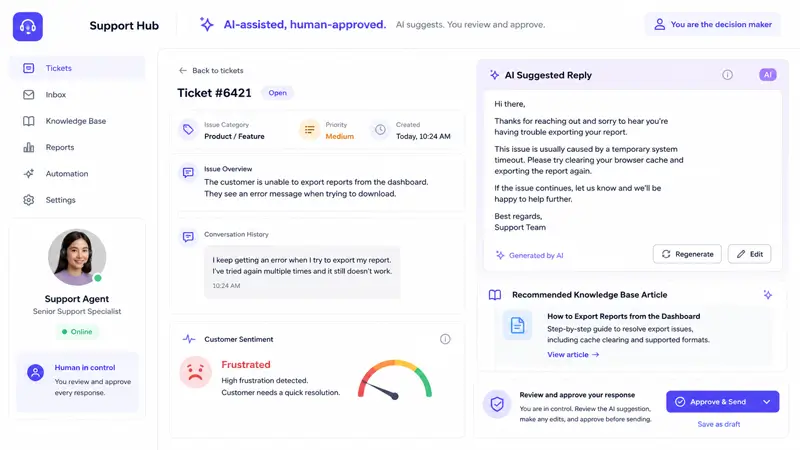
AI adds the most value in the middle of the support workflow — not at the final decision point. Useful AI tasks include:
- Summarizing long or multi-message tickets for agents
- Suggesting draft replies based on ticket content and past resolutions
- Detecting customer intent and routing accordingly
- Recommending relevant help articles at the right moment
- Identifying urgency or frustration signals in ticket language
- Writing or improving knowledge base articles using the Write with AI feature
- Tracking chatbot performance and flagging unresolved conversations
AI should not replace humans in these situations:
- Complex multi-step technical troubleshooting
- Emotional complaints or disputes requiring empathy
- Refund exceptions outside standard policy
- Legal, compliance, or privacy-sensitive account issues
- VIP customer conversations
- Unclear or unusual cases where context matters more than speed
The appropriate model is AI-assisted, human-approved for agent-facing tasks, and AI-first, human-escalated for customer-facing interactions. Both approaches keep a person in the decision loop for high-stakes outcomes.
Customer Support Automation Software: What Features to Look For
When evaluating customer support automation software, look for these practical capabilities rather than marketing features:
- Ticket management with clear status, ownership, and prioritization.
- Automated routing and assignment rules.
- Saved or canned responses for common questions.
- AI reply suggestions or drafting support.
- Knowledge base integration and article suggestions.
- SLA tracking and escalation workflows.
- Internal notes and collaboration tools.
- Customer history and context in the same workspace.
- Reporting and analytics for response time, search gaps, and satisfaction trends.
- Integrations with ecommerce, WordPress, and communication tools such as WooCommerce, Slack, WhatsApp, forms, or webhooks.
For WordPress-based support teams, Support Genix offers all of these in one product, with specific integrations for WooCommerce, Slack, WhatsApp, WPForms, and Easy Digital Downloads — reducing the plugin stack and keeping support data in one place. You can compare pricing tiers on the SupportGenix pricing page.
Customer Service Workflow Automation Checklist
Use this checklist before you turn any workflow live:
- Define support categories and ownership rules.
- Write first-response templates for the most common request types.
- Set priority rules and SLA targets.
- Create escalation rules for urgent, overdue, or high-risk issues.
- Connect knowledge base articles to common ticket topics.
- Test automated responses with real support scenarios.
- Review failed automation cases every month.
- Measure response time and resolution quality, not just speed.
- Update workflows when products, policies, or support volume changes.
Common Mistakes to Avoid
Automating too much too early is the most common mistake. When teams push complex, emotional, or exception-heavy requests through rigid workflows, customers feel trapped rather than helped.
Other avoidable problems:
- Generic automated responses that do not address the actual question
- Hiding human support options behind chatbot layers with no visible escape path
- Skipping analytics review so failed workflows run undetected for weeks or months
- Stale knowledge base content that suggests outdated articles to frustrated customers
- Sending irrelevant help articles based on keyword matches instead of actual intent
- Ignoring customer sentiment signals that should trigger human escalation
- Measuring only speed instead of whether the problem was actually resolved
- No feedback loop from agents to surface workflow gaps before customers notice them
The consequences of poor customer service, including lost revenue, damaged reputation, and increased churn, are well documented. Poor automation is poor customer service.
Frequently Asked Questions
What is customer service workflow automation?
Customer service workflow automation is the use of predefined rules, templates, and AI-assisted processes to move support requests through repeated steps automatically. That can include ticket tagging, assignment, first-response messages, follow-up reminders, knowledge base suggestions, and escalations, while human agents take over when the case is complex or sensitive.
What are examples of automated customer service?
Common automated customer service examples include instant acknowledgment emails, ticket routing, SLA reminders, order-status updates, refund intake workflows, knowledge base article suggestions, chatbot answers for common questions, and AI-generated draft replies for agents. These examples work best when the task is repetitive and low risk.
What are the advantages of automated customer service?
The main advantages are faster first responses, more consistent replies, lower manual workload, better routing, stronger self-service, and easier reporting. Automation can also help support teams scale routine operations more predictably, especially when workflows are tied to a knowledge base and reviewed with analytics regularly.
What are the disadvantages of automated customer service?
The biggest disadvantages are poor customer experience when workflows are generic, routing errors when rules are inaccurate, and frustration when customers cannot reach a human for sensitive issues. Automation also needs ongoing monitoring, because old templates and outdated help content quickly reduce quality.
How is customer service automation different from AI customer support?
Customer service automation is the broader system of rules, triggers, and workflows that handle repetitive support tasks. AI customer support is one part of that system and usually focuses on tasks such as intent detection, summarization, reply drafting, chatbot responses, or knowledge recommendations.
What customer service tasks should not be automated?
You should avoid fully automating angry complaints, refund exceptions, legal or billing disputes, complex troubleshooting, VIP customer conversations, and security-sensitive account issues. These cases need human judgment, context, and empathy, even if automation helps with summaries or routing in the background.
What is an automated customer support system?
An automated customer support system is a help desk or support platform that uses workflow rules, templates, integrations, self-service tools, and sometimes AI to manage support requests. It usually combines ticketing, notifications, routing, reporting, knowledge base features, and escalation controls in one place.
How do small businesses start with support automation?
Small businesses should begin with the most repetitive, low-risk tasks: tagging tickets, sending first-response messages, routing common categories, and suggesting knowledge base articles. After that, they can review ticket trends and failed searches, then add more advanced automation only where it clearly reduces manual work without harming the customer experience.
Conclusion
Customer service workflow automation works best when it removes the predictable, repetitive work from your team’s plate and keeps humans available for the situations that genuinely need judgment.
The right starting point is not the most ambitious workflow — it is the most repeated one. Start with ticket tagging, first-response templates, routing rules, and knowledge base suggestions. Measure the results. Then build from there.
If you are running support on WordPress or WooCommerce and want to explore what a structured workflow looks like in practice, the Support Genix features page and the AI chatbot setup guide are useful starting points.
For a broader look at how to improve your customer service strategy, including team management, reporting, and long-term service quality, the Support Genix blog covers those topics in depth.