WooCommerce Helpdesk System: When Do You Need One?

A WooCommerce helpdesk system becomes useful when customer questions are no longer easy to manage through one inbox.
If your team is tracking order issues across emails, contact forms, chats, or multiple agents—and customers are waiting for updates—a ticketing workflow can help you assign ownership, see order context, and follow every request through to resolution.
Smaller stores with a single support channel may still manage well with a shared inbox. The need usually appears when support becomes harder to track, not at a fixed number of daily tickets.
Quick Answer: You need a WooCommerce helpdesk system when support requests are difficult to track across channels, team members, or individual orders. It gives each request a clear owner, keeps conversation history in one place, and helps agents access the order context needed to resolve questions without switching between tools.
Table of Contents
What Is a WooCommerce Helpdesk System?
A WooCommerce helpdesk system is customer-support software that organizes requests into trackable tickets and connects those conversations with the information needed to resolve store-related issues.
Instead of treating every email, form submission, or chat follow-up as a separate message, a helpdesk creates a structured support lifecycle. Each request can have a status, owner, priority, conversation history, and internal notes.
For WooCommerce stores, the most useful systems can also surface relevant order information while the agent is handling the ticket.
That structure matters when customers ask questions such as:
- Where is my order?
- Can I change my delivery address?
- Why was my payment declined?
- Can I return an item?
- I received the wrong product—what should I do?
- Can you help me choose the right product before I buy?
These are not just messages. They are support cases that may require order lookups, follow-ups, handoffs between team members, refunds, shipment checks, or internal coordination.
How does WooCommerce support work without a helpdesk?
At an early stage, a shared email inbox can be enough. One person can read incoming messages, check the WooCommerce dashboard, reply to customers, and keep a mental list of follow-ups.
The workflow becomes harder once requests arrive from multiple places or multiple people handle replies.
Consider a typical delivery issue:
“My order #4512 has not arrived. Can you tell me where it is?”
Without a helpdesk, an agent may need to:
- Find the original email, form message, or chat transcript.
- Open WooCommerce in a separate browser tab.
- Search for the order number or customer email.
- Check the order status, shipping address, items, and notes.
- Ask another teammate whether they already contacted the carrier.
- Reply to the customer.
- Remember to follow up if the shipment remains unresolved.
None of these actions is difficult on its own. The problem is that the process is easy to lose track of when it repeats across many conversations, channels, and agents.
A helpdesk changes the workflow from a sequence of disconnected tasks into a visible case:
Ticket → related order context → assigned owner → internal note → customer reply → tracked follow-up
Mapping the workflow this way, rather than describing features in the abstract, shows what actually changes once order data and ticket tracking are connected.
When does a WooCommerce store need a helpdesk system?
You likely need a WooCommerce helpdesk system when support requests become difficult to own, track, or resolve consistently. The trigger is operational complexity—not a universal daily-ticket number.
Common signs include:
- Customer messages arrive through more than one channel, such as email, contact forms, live chat, or a customer portal.
- More than one person responds to support requests.
- Agents frequently need to check order, shipping, refund, payment, or purchase details before replying.
- Customers need follow-ups, but conversations get buried in inboxes or chat histories.
- Team members accidentally send duplicate replies or assume someone else has already responded.
- You need to see which requests are open, pending, urgent, or unresolved.
- Repetitive questions make it difficult to identify documentation gaps or product issues.
- You want a reliable record of what was promised to a customer and what happened next.
The value of a helpdesk is not simply that it receives tickets. Its value is that it makes support work visible and repeatable.
A practical example
Imagine that a customer asks for a refund, then follows up two days later because they have not received an update. In a shared inbox, the original message may be archived, assigned informally, or mixed with unrelated conversations.
In a structured helpdesk workflow, the team can see the ticket status, who owns it, the previous replies, related order details, and any internal notes. The agent does not need to reconstruct the situation from scratch before responding.
Example WooCommerce Support Workflow
A typical “paid but not shipped” inquiry moves through a helpdesk in a predictable sequence:
Customer says order has been paid for but hasn’t shipped → ticket created → agent sees WooCommerce order status → ticket assigned to shipping/support → internal note added → customer receives status update → follow-up scheduled if unresolved → ticket closed.
Mapping the workflow this way, rather than describing features in the abstract, shows what actually changes once order data and ticket tracking are connected.
Common WooCommerce Customer Support Challenges
WooCommerce store owners face a unique set of support hurdles that grow more painful as order volume increases.
- Messages scattered across channels: Customer inquiries arrive through email, contact forms, social media DMs, and sometimes WhatsApp. Without a central hub, agents switch between platforms constantly, and messages get buried.
- No visibility into open or resolved issues: In a shared inbox, there is no dashboard showing how many tickets are open, who owns each one, or how long a customer has been waiting.
- Repeated questions and delayed responses: “Where is my order?” and “How do I return this?” come in dozens of times a day. Without templates or a knowledge base, agents retype similar answers from scratch, slowing everything down.
- Missed follow-ups and frustrated customers: When there is no status tracking, it is easy for a partially resolved issue to fall off the radar. The customer waits. Frustration builds. A refund request or negative review follows.
- Limited performance data: Without reporting, it is difficult to measure response times, spot bottlenecks, or identify which product categories generate the most tickets.
These problems compound as your store grows. What feels manageable at 10 orders a day becomes chaotic at 50 or 100.
When a shared inbox may still be enough
A shared inbox can still work for a small WooCommerce store when one person handles support, requests arrive through one main channel, and follow-ups are easy to monitor.
You may not need a dedicated helpdesk yet if:
- One person owns nearly all customer communication.
- Order-related questions are infrequent and simple.
- There is one reliable inbox and no important messages are lost.
- You do not regularly need to assign, escalate, or transfer cases.
- You can identify every pending customer issue without relying on memory or manual spreadsheets.
The goal is not to add software prematurely. Adopt a helpdesk when those conditions stop being true—not because a generic benchmark says your store has crossed a fixed ticket threshold.
WooCommerce Helpdesk vs. email, contact forms, and live chat
A shared inbox can be a reasonable middle ground between a single personal inbox and a full WooCommerce helpdesk system — it is not always a binary choice between a basic inbox and dedicated software.
| Feature | Basic email inbox | Contact form | Live chat | Helpdesk system |
| Request tracking | Mostly manual | Submission record | Conversation/session based | Structured ticket lifecycle |
| Agent assignment | Usually manual | Depends on form workflow | Often supported | Usually built in |
| Priority levels | Manual labels/flags | Usually limited | Platform-dependent | Commonly supported |
| Multiple channels | Primarily email | Website forms | Chat/messaging | Can combine channels depending on integrations |
| WooCommerce order context | Manual lookup | Usually absent | Integration-dependent | Available with WooCommerce integration |
| Reporting | Limited | Limited | Chat metrics may be available | Support-focused response/resolution reporting |
| Scaling a team | Becomes harder to coordinate | Limited workflow | Requires active chat coverage | Designed for ticket ownership and team workflows |
Features That Actually Matter in a WooCommerce Helpdesk
Not every helpdesk feature carries equal weight for a WooCommerce store. Look for:
- WooCommerce order context: Agents can view relevant customer and order details without repeated manual searches.
- Ticket ownership and status: Every request has a clear owner and resolution state.
- Priority rules: Urgent payment, shipping, or refund issues can be surfaced appropriately.
- Email-to-ticket conversion: Customer emails become trackable support requests.
- Customer history: Previous conversations are easier to retrieve.
- Knowledge base: Common questions can be answered through self-service.
- Reporting: First-response and resolution data help identify bottlenecks.
- Automation: Becomes useful once manual assignment and routing become inefficient.
How to Choose the Right WooCommerce Helpdesk
Before committing to any tool, it helps to map the decision against actual operating conditions rather than marketing claims:
- Does it show WooCommerce order data directly inside the ticket, or does it require switching tabs?
- Does pricing scale with agents and tickets, or stay flat as the team grows?
- Does it support the specific channels customers actually use — email, chat, forms, WhatsApp, social?
- Does it provide response-time and resolution-time reporting, or only basic ticket counts?
- Does a WordPress-native solution or a separate SaaS platform fit your team’s workflow, integrations, hosting preferences, and maintenance requirements better?
Common Support Implementation Mistakes
Even well-intentioned stores fall into avoidable traps when running a WooCommerce helpdesk system:
- Continuing to rely only on a basic shared inbox after multiple people begin handling support, which produces duplicate replies and no accountability.
- Skipping ticket ownership or priority rules, so agents assume someone else will handle urgent issues.
- Setting no response-time targets, leaving no benchmark for whether support is actually improving.
- Ignoring support history, forcing every new interaction to start from scratch instead of building on a customer’s past tickets.
- Skipping self-service options. A knowledge base or FAQ section can meaningfully reduce repetitive tickets when it actually answers the questions customers ask most.
Using Support Genix as a WooCommerce Helpdesk
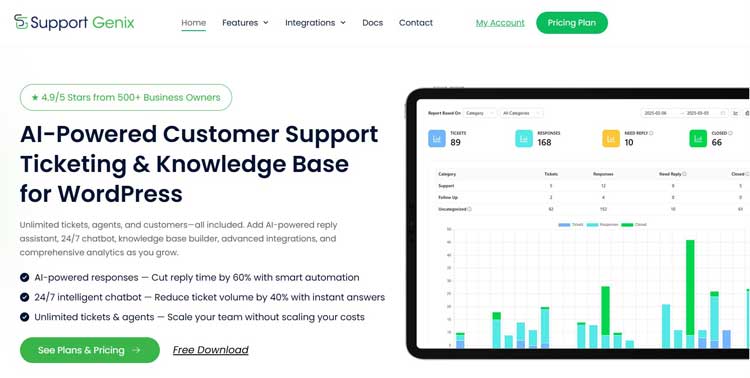
Support Genix is a WordPress support-ticket plugin with a WooCommerce integration designed to put order context next to support conversations.
With the integration enabled, teams can view order information in tickets, let customers submit tickets from WooCommerce My Account, verify order ID and email details, and automatically create tickets for new orders. It can also centralize support from multiple WooCommerce stores, including externally hosted stores.
The practical benefit is simple: when a customer asks about an order, the agent can work from the ticket and its related purchase details instead of moving repeatedly between an inbox and the WooCommerce dashboard.
Support Genix supports unlimited tickets, users, and customers without per-agent pricing. Paid licenses provide access to the full premium feature set and support options, with pricing based primarily on the number of websites covered. See the current Support Genix pricing details for the latest plan information.
You can also view the WooCommerce integration features to see how order details, My Account ticket submission, customer verification, and store connections fit into the workflow.
Add an authentic product visual here: Use a real Support Genix WooCommerce ticket screenshot with demo or blurred customer data. Show the ticket subject, ticket status, assigned agent, customer details, related order information, and an internal note. Avoid stock imagery.
Recommended alt text: “Support Genix ticket showing an order-delivery request, assigned agent, ticket status, customer details, and linked WooCommerce order information.”
Suggested caption: “Example WooCommerce support workflow: the ticket, assignee, customer details, and related order context appear in one workspace.”
If your store is reaching the point where order-related conversations are difficult to track, test whether this workflow fits the way your team handles support today.
Frequently Asked Questions
What is a WooCommerce helpdesk system?
A WooCommerce helpdesk system converts customer inquiries from email, chat, forms, and social media into organized, trackable tickets inside a store’s support workflow, with ownership, status, and reporting attached to each one.
Do small WooCommerce stores need a helpdesk?
Not necessarily. The deciding factor is whether messages are being missed, multiple people are answering the same inbox, or order lookups are becoming repetitive — not a fixed daily ticket count.
What is the difference between WooCommerce live chat and a helpdesk?
Live chat is primarily for real-time conversations. A helpdesk manages the full lifecycle of a support request, including ownership, status, order context, internal collaboration, follow-up, and resolution history. Many stores use chat for immediate questions and a helpdesk for ongoing support cases.
Can customers submit tickets from their WooCommerce account?
This depends on the helpdesk you use. Support Genix provides WooCommerce My Account integration so customers can submit support tickets from their account area, while agents can work with the associated customer and order context.
Can a WooCommerce helpdesk help with returns and refunds?
Yes. A helpdesk can give each return or refund request a clear owner, preserve the conversation history, record internal notes, and make it easier to track whether the customer needs another update. Your actual return and refund policies should still be clearly communicated on the store.
Should I use email or a ticketing system for customer support?
Email may be sufficient for simple, low-volume support. A ticketing system is usually a better fit when you need assignment, status tracking, team collaboration, customer history, reporting, or a reliable record of unresolved cases. Read the full comparison of email vs. ticketing systems.
Final Thoughts
Structured customer support becomes more valuable as a WooCommerce store adds channels, agents, and order volume, but choosing a WooCommerce helpdesk system is a fit-based decision, not a one-size-fits-all upgrade.
Reviewing where messages currently get lost, where responses slow down, and where agents repeatedly need to look up order information is the most reliable way to determine whether it is time to move from an inbox to a dedicated WooCommerce helpdesk system.