Fluent Support Alternative: Support Genix vs Fluent Support

If you’re comparing Fluent Support alternatives, Support Genix is one option worth considering. The right choice depends on whether you prioritize lifetime pricing, a customer-facing AI chatbot, built-in knowledge-base tools, or native integrations with platforms such as LearnDash and BuddyPress.
This comparison examines Support Genix and Fluent Support across their core features, AI capabilities, integrations, pricing, and migration options to help you choose the right WordPress helpdesk plugin.
Quick Verdict: Support Genix is the stronger fit if you want a self-service AI chatbot trained on your knowledge base and prefer the option of a one-time lifetime license instead of recurring annual fees. Fluent Support is the stronger fit if you want agent-side AI across multiple providers (OpenAI, Gemini, Anthropic) and the ability to connect external AI agents like Claude or Cursor directly to your helpdesk data through its MCP server.
Table of Contents
Support Genix vs Fluent Support at a Glance
| Dimension | Fluent Support | Support Genix |
| Free version | Yes, on WordPress.org | Yes, on WordPress.org |
| Unlimited tickets/agents | Yes, all plans | Yes, free and Pro |
| Licensing model | Annual only | Yearly and lifetime |
| Customer-facing AI chatbot | Not confirmed as a native feature in current documentation | Yes, knowledge-base-trained, embeddable via script tagwordpress+1 |
| Agent-side AI (replies, summaries) | Yes — OpenAI, Gemini, Anthropic (as of v2.3.0) | Yes — Support Genix AI, OpenAI, Claude |
| AI-agent/MCP connectivity | Yes, native MCP server with 25 tools (v2.3.0+) | Not confirmed as a native feature in current documentation |
| WooCommerce integration | Native, order-to-ticket linking. | Standard (free, order context) + Advanced (Pro, external stores, event-based tickets). |
| Migration tooling | Migrates from Zendesk, Freshdesk, Help Scout via WP-CLI. | Built-in migration from Fluent Support and BetterDocs. |
Support Genix
WordPress Support Ticket Plugin
Take Your Customer Support to The Next Level and Boost Customer Satisfaction Rates
Fluent Support Alternatives: How We Compared the Plugins
This comparison is based on each vendor’s official documentation, changelog and release notes, and current public pricing pages, verified on August 9, 2026. We did not perform a hands-on installation test on a live WordPress environment for this update. Where a feature could not be confirmed in official documentation, it’s marked “not confirmed” rather than assumed absent.
AI Features: The Important Differences
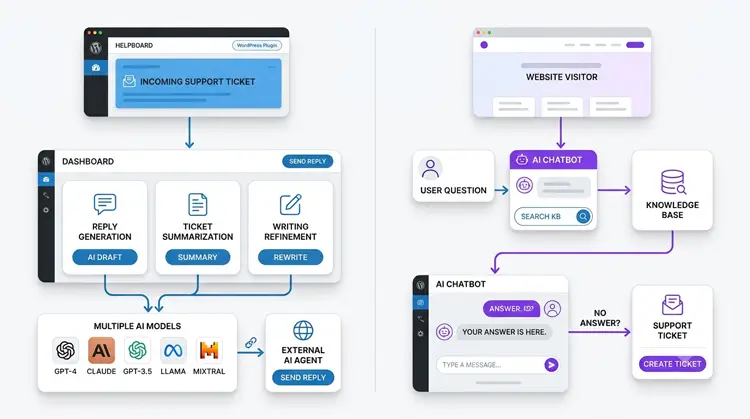
Two AI workflows for WordPress support: customer-facing chatbot versus agent-side AI helpdesk workflow.
AI capability is the single biggest differentiator between these two plugins, and treating “AI” as a yes/no checkbox misrepresents both products.
Fluent Support’s AI, as of version 2.3.0 (released July 12, 2026):
- AI-generated replies, ticket summarization, and writing refinement, now supporting OpenAI, Google Gemini, and Anthropic as selectable backends.
- A native MCP (Model Context Protocol) server with 25 tools, letting compatible AI agents like Claude Desktop, Claude Code, or Cursor triage queues, read tickets, draft replies, tag and assign tickets, and pull performance reports directly.
- The MCP server is off by default and requires WordPress 6.9 or later, plus the free companion FluentHub plugin, to activate.
Support Genix’s AI:
- A customer-facing AI chatbot that can be embedded on any website (not just WordPress) via a script tag, trained on your knowledge base content.
- An AI documentation writer for building knowledge base articles.
- AI-assisted ticket replies powered by “Support Genix AI” (a built-in service with free starter credits), or external OpenAI and Claude API keys.
What this means practically: If your priority is giving customers a self-service chatbot, Support Genix has the more clearly documented native feature. If your priority is giving your support agents an AI assistant that can act across multiple LLM providers or connect to external AI tools, Fluent Support’s 2.3.0 update is more advanced in that specific area.
On AI costs: Support Genix’s built-in AI service includes free credits to start, so it doesn’t strictly require an external API key, though you can supply your own OpenAI or Claude key.
Fluent Support’s AI features require you to supply your own API key for OpenAI, Gemini, or Anthropic; check each vendor’s documentation for current usage-cost details, since API usage can incur separate charges from the provider.
Email-to-Ticket and Mailbox Limits
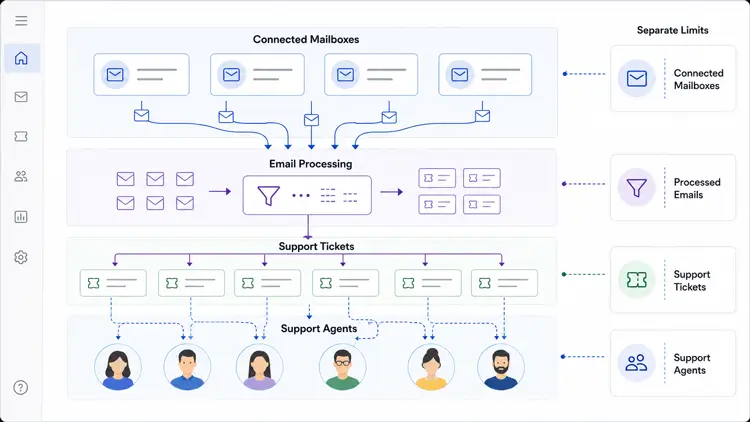
Don’t confuse “unlimited tickets” with “unlimited connected mailboxes” — these are different limits.
- Fluent Support’s Agency license (5 sites) includes 50 business-email piping addresses, and the 50-site license includes 500 addresses; email parsing itself is unlimited on all paid tiers.
- Support Genix’s email-to-ticket conversion is a Pro feature; check the current pricing page for the exact mailbox allowance on your selected tier, since this can vary by plan.
WooCommerce and LMS Integrations
Support Genix’s WordPress.org listing separates two tiers of WooCommerce support: a standard integration (available free) that shows customer order history inside tickets, and an “Advanced” WooCommerce integration (Pro) that adds support for external WooCommerce stores and automatic ticket creation triggered by WooCommerce events. Fluent Support’s WooCommerce integration links tickets to orders natively and also supports LearnDash, LifterLMS, Tutor LMS, and BuddyPress/BuddyBoss integrations.
Setting Up Support Genix
Getting Support Genix running takes a few minutes and doesn’t require touching code.
- Install and activate. Upload the plugin zip via WordPress Admin, Plugins, Add New, or search “Support Genix” in the plugin directory, then activate it.
- Run the Setup Wizard. It walks you through creating a support page (auto-assigned the support_genix shortcode), uploading a logo, adding your first agent, and creating a ticket category.
- Activate your license (Pro). Go to Support Genix, Settings, Manage License, paste the license key from your client portal, and confirm.
- Configure email-to-ticket, custom fields, and the AI chatbot under Support Genix, Settings, using either the Modern (email forwarding) or Traditional (IMAP piping) mailbox method.
Compared to Fluent Support’s setup — which also uses a guided wizard but requires the separate FluentHub plugin and WordPress 6.9+ if you want to enable the MCP server — Support Genix’s core setup is simpler because AI chatbot and agent-assist features live inside the same plugin without extra dependencies.
Read the full walkthrough in our Support Genix setup guide: https://supportgenix.com/doc/how-to-install-and-activate-support-genix/
Agent Management: Roles, Permissions, and Assignment
Both plugins support unlimited agents on paid plans, but they differ in how granular role management gets.
| Capability | Fluent Support | Support Genix |
|---|---|---|
| Unlimited agents | Yes, all plans | Yes, free and Pro |
| User roles & permissions | Yes | Yes (Free) |
| Multi-role user selection | Not confirmed | Pro |
| Auto mailbox assign per agent | Not confirmed in docs reviewed | Pro |
| Saved replies for agents | Yes | Free |
| Agent-side AI reply drafting | Yes — OpenAI, Gemini, Anthropic | Yes — Support Genix AI, OpenAI, Claude |
Adding an agent in Support Genix happens during the Setup Wizard or later under Support Genix, Users, where you enter a name, email, and assign a role. See the step-by-step guide to creating a support agent: https://supportgenix.com/doc/create-support-agent/
Agents can use saved replies, get tickets routed to them via assign rules, and — on Pro — have their AI writing assistant draw on OpenAI or Claude credentials configured centrally under Settings, API Keys.
Automation: Assign Rules, Auto-Close, and Triggers
Automation is where the two plugins diverge most outside of AI.
- Assign rules: Support Genix lets you set auto-assignment rules so new tickets route to the right agent automatically. See the full ticket assign rule documentation: https://supportgenix.com/doc/ticket-assign-rule/
- Auto-close and tag exclusion: Pro unlocks auto-trash/auto-delete and tag-exclusion auto-close rules to keep the ticket queue clean without manual triage.
- Event-based ticket creation: Support Genix’s Advanced WooCommerce integration (Pro) can automatically create tickets triggered by WooCommerce events on external stores, not just the same-site store.
- Fluent Support’s automation edge: its native MCP server (v2.3.0+) lets external AI agents like Claude Desktop or Cursor triage queues, tag, and assign tickets programmatically — effectively an AI-driven automation layer rather than static rule sets.
If your workflow depends on simple, visual rule-based automation (assign rules, auto-close, WooCommerce-triggered tickets), Support Genix covers that natively. If you want an AI agent doing the triaging and assignment for you, Fluent Support’s MCP tooling is more advanced as of this writing.
Fluent Support vs Support Genix Pricing
Pricing verified on August 9, 2026. Promotional prices and renewal terms change frequently — confirm current rates on each vendor’s pricing page before purchasing.
Fluent Support Pricing
| Plan | Promotional (1st year) | Regular/list price | Billing | Sites | Mailbox limit |
| Single Site | $90 | $129 | Annual | 1 | Not listed |
| Agency | $174 | $249 | Annual | 5 | 50 addresses |
| 50 Sites | $279 | $399 | Annual | 50 | 500 addresses |
Fluent Support’s pricing page states these are first-year promotional rates (a 30% discount); it does not display lifetime plans. Renewal pricing should be confirmed directly with Fluent Support before purchase.
Support Genix Pricing
Support Genix offers both yearly plans (starting around $99/year, with promotional first-month rates as low as $1) and lifetime plans across Personal, Developer, and Agency tiers. Live promotional pricing changes often — for example, a $199 Agency Lifetime price against a $699 list price was observed on the pricing page on August 9, 2026. Check the official pricing page for the exact current promotional price, list price, and renewal terms for your site count before buying.
Five-Year Cost Consideration
Fluent Support uses recurring annual licenses, so its five-year cost is the renewal price multiplied by five (not the promotional first-year price). Support Genix also offers lifetime licenses.
These may reduce total license spend over several years, depending on the plan selected, the future update policy, and how long you keep the license. However, this isn’t guaranteed savings in every case. Lifetime deals can sometimes have narrower update or support windows than ongoing annual plans..
Compare both vendors’ terms of service for update and support duration before assuming long-term savings.
How to Migrate from Fluent Support to Support Genix
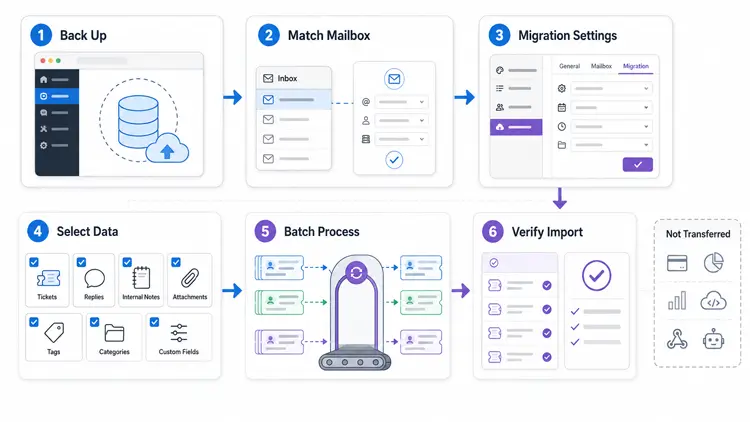
Support Genix includes a built-in migration tool specifically for Fluent Support users.
- Back up your site first. Migration is irreversible.
- Set up a matching mailbox. The email address connected to Fluent Support must also be configured as a mailbox inside Support Genix (Modern or Traditional method).
- Open the Migrations panel. Go to Support Genix → Settings → Migrations → Fluent Support tab.
- Review what transfers. Tickets, notes, responses, and attachments migrate, along with products (imported as categories), tags, and custom fields. Third-party integration data does not migrate.
- Confirm and run. Migration processes up to 100 tickets per batch — repeat the process for larger ticket volumes.
- Verify the results in the Support Tickets section afterward.
See the official migration guide for the full walkthrough.
Pros and Cons of Each Plugin
Support Genix
- Pros: Customer-facing AI chatbot trained on your knowledge base; lifetime licensing option; built-in Fluent Support migration tool; free tier includes standard WooCommerce order context.
- Cons: Email-to-ticket is Pro-only with mailbox limits that vary by plan; no native MCP/AI-agent connectivity confirmed; LMS integrations (LearnDash, LifterLMS) less established than Fluent Support’s.
Fluent Support
- Pros: Native MCP server with 25 tools for external AI agents; multi-provider agent-side AI (OpenAI, Gemini, Anthropic); mature LearnDash, LifterLMS, Tutor LMS, and BuddyPress/BuddyBoss integrations.
- Cons: Annual-only billing, no lifetime option; no native customer-facing AI chatbot confirmed; MCP server requires WordPress 6.9+ and the separate FluentHub plugin.
Which Plugin Is Better for Each Use Case?
- Solo store or small business: Support Genix’s lifetime pricing option can reduce long-term licensing overhead if you plan to keep the site for years.
- Agency managing several client sites: Compare Fluent Support’s per-site annual renewal cost against Support Genix’s lifetime Agency tier directly for your exact site count.
- LMS or membership site: Fluent Support’s native LearnDash, LifterLMS, and BuddyPress/BuddyBoss integrations are more established.
- WooCommerce store wanting AI self-service: Support Genix’s customer-facing chatbot with knowledge-base training and embeddable widget is the more directly documented fit.
- Team wanting AI agents (Claude, Cursor) connected to the helpdesk: Fluent Support’s MCP server is the more advanced option here as of version 2.3.0.
Limitations of This Comparison
This comparison is based on official documentation, changelogs, and publicly available pricing reviewed on August 9, 2026. We did not independently install or performance-test both plugins.
- Pricing, promotions, plan limits, and AI allowances may change.
- Support Genix mailbox limits and plan-specific AI availability should be confirmed before purchasing.
- We did not independently evaluate dashboard performance, ease of use, update quality, or customer-support response times.
Check each product’s official documentation and pricing page for the latest details.
Frequently Asked Questions
Is Support Genix a good alternative to Fluent Support?
Yes, for site owners who want a native, customer-facing AI chatbot and the option of a lifetime license. Fluent Support remains a strong choice if you need multi-provider agent-side AI or MCP-based AI agent connectivity.
Does Fluent Support have AI features?
Yes. As of version 2.3.0 (July 2026), Fluent Support supports AI-generated replies, summarization, and writing refinement across OpenAI, Google Gemini, and Anthropic, plus a native MCP server for connecting external AI agents.
Does Support Genix have a free version?
Yes, available on WordPress.org, with core ticketing and a standard WooCommerce integration included free; Advanced WooCommerce integration and other features are Pro-only.
Can I migrate my existing Fluent Support tickets to Support Genix?
Yes. Support Genix’s built-in migration tool transfers tickets, notes, replies, attachments, tags, and custom fields in batches of up to 100 tickets; third-party integration data does not transfer.
Is Fluent Support or Support Genix cheaper long-term?
It depends on the plan and how long you keep the license. Fluent Support uses annual-only billing with first-year promotional pricing; Support Genix offers both annual and lifetime options. Compare current renewal and lifetime terms directly on each pricing page before deciding.
Does Support Genix’s WooCommerce integration require the Pro plan?
Partially. Standard WooCommerce order-history display is included free; the Advanced WooCommerce integration (external stores, event-triggered tickets) requires Pro.
Do Fluent Support’s and Support Genix’s AI features require an external API key?
Support Genix’s built-in AI service includes free starter credits, so an external key isn’t strictly required, though you can add your own OpenAI or Claude key. Fluent Support’s AI features require you to supply your own OpenAI, Gemini, or Anthropic API key.
Final Verdict
There’s no universal winner in the Fluent Support alternative decision — Support Genix stands out for its customer-facing AI chatbot and lifetime pricing flexibility, while Fluent Support’s 2.3.0 update makes it more competitive for agent-side, multi-provider AI and AI-agent connectivity.
Match your choice to which AI workflow and licensing model your site actually needs, and confirm current pricing before purchasing either plugin.
For most WooCommerce and single-site owners choosing between the two today, Support Genix’s lifetime pricing and native chatbot make it the lower-risk pick; agencies and LMS-heavy sites should weigh Fluent Support’s automation and integration maturity before switching.